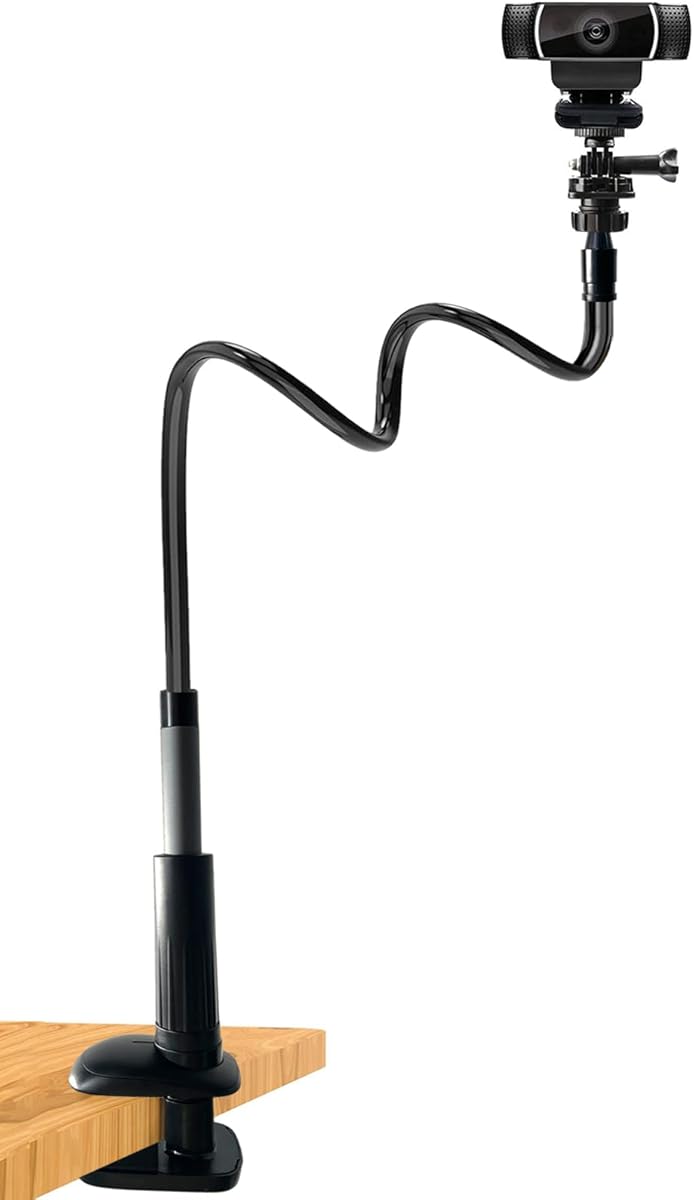
30 Inch Webcam Stand Camera Mount, Upgraded Thick Base Flexible Gooseneck Camera Stand Desk Webcam Mount Clamp
4.1Editor score
Up to 30 inches height
Thick durable clamp base
360 degree ball joint
Finding the right clamp on webcam arm can transform your video conferencing and streaming experience by providing stable and adjustable camera positioning. These mounts offer flexibility that standard desks lack, allowing you to capture the perfect angle without cluttering your workspace with bulky tripods.
We have carefully evaluated the leading models on the market based on build quality, clamp strength, arm flexibility, and overall stability. Our selection process focuses on products that deliver reliable performance for daily use, ensuring that your camera remains steady during important calls or creative projects.
Each pick in this list highlights specific strengths and ideal use cases to help you match the mount to your unique needs. Please note that product availability and pricing can change frequently, so always verify the latest details before making your final purchase decision.
4.1Editor score

5.0Editor score

4.4Editor score
As an Amazon Associate we earn from qualifying purchases.
The following table provides a side-by-side comparison of all ten models reviewed in this guide, highlighting key specifications and features to help you quickly identify the best option for your specific workflow and device requirements.


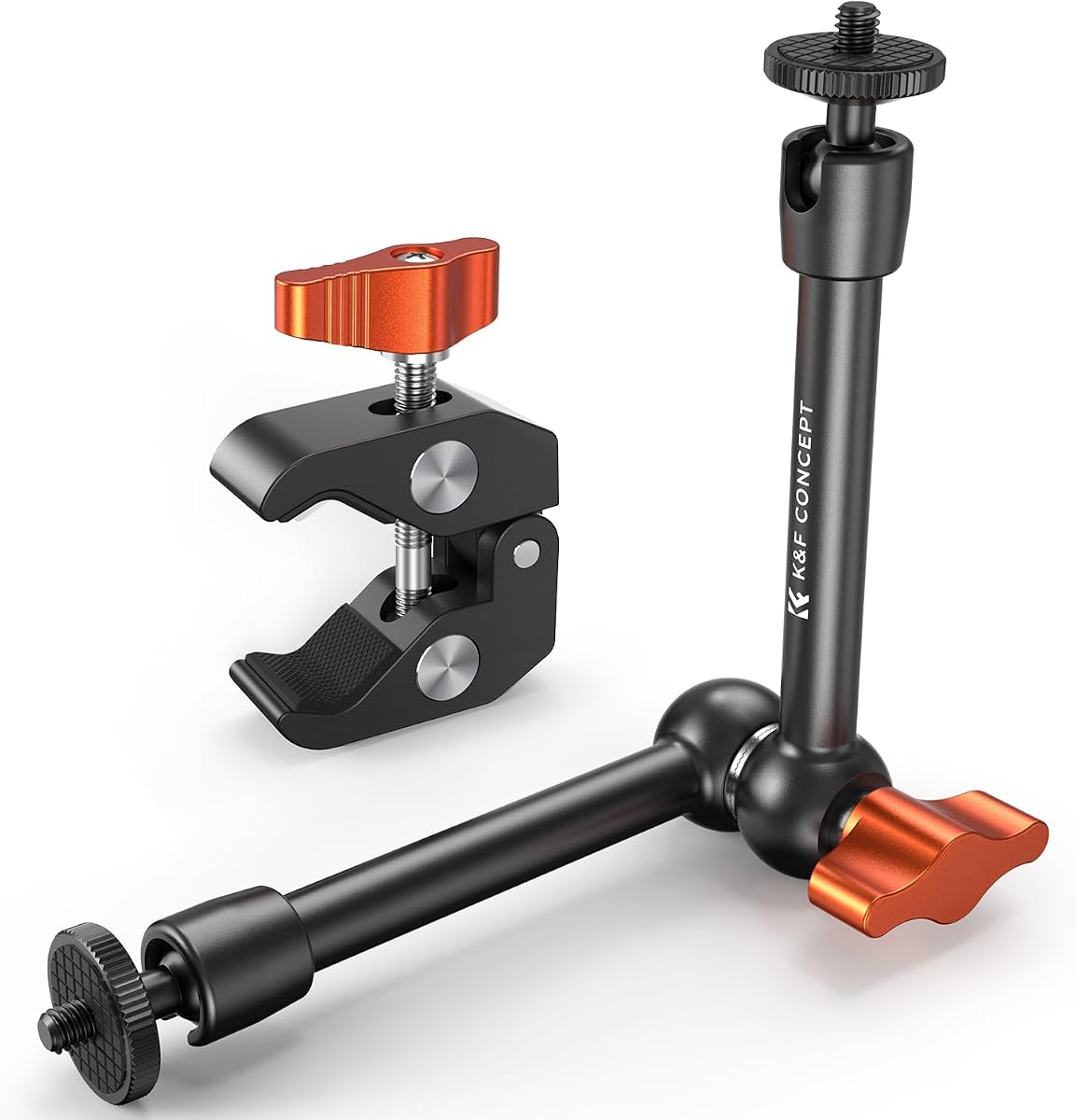


This versatile mount stands out as the top choice for users seeking a reliable and highly adjustable solution. It received a perfect 5.0 rating from verified buyers who praised its ability to hold various devices securely.
We may earn a commission when you buy through this link, at no additional cost to you.
The gooseneck arm is crafted from a premium solid aluminum-magnesium alloy core, ensuring it remains rigid enough to support devices without drooping. You can shape it into S or Z curves for enhanced stability during video calls or content creation.
While the arm is highly flexible, some users note it may bend slightly under heavier loads if not shaped correctly. This trade-off is acceptable given the exceptional range of motion and the convenience of a foldable design.
Content creators and hybrid workers will find this mount ideal for achieving professional video angles. It is the ultimate all-in-one solution for Zoom calls, streaming, and multi-device setups.
Works seamlessly with webcams, action cameras, and smartphones via a standard 1/4 inch thread.
Fully foldable design allows for easy storage and transport without taking up desk space.
We may earn a commission when you buy through this link, at no additional cost to you.
Affordability meets functionality in this model, making it a favorite for budget-conscious buyers. With a 4.1 rating, users appreciate the thickened clamp base that secures the mount firmly on various surfaces.
We may earn a commission when you buy through this link, at no additional cost to you.
The arm extends up to 30 inches, providing significant reach for overhead shots or tall desk setups. The 360-degree rotating ball joint allows for precise angle adjustments to capture the best view.
Users should note that the load capacity is limited to 0.7 kg, so it is best suited for lightweight webcams rather than heavy cameras. Ensuring your desk is steady will minimize any bouncing during use.
This is an excellent entry-level option for anyone needing a flexible mount without a high investment. It serves well for standard video conferencing and casual streaming needs.
The clamp base is thicker and more durable to secure the mount without needing excessive tightening.
Clamp can open up to 2.7 inches to fit desks, nightstands, and kitchen counters securely.
We may earn a commission when you buy through this link, at no additional cost to you.
Professional creators will appreciate the robust construction of this magic arm clamp. Rated 4.4, it is designed for overhead shooting and live streaming where stability is paramount.
We may earn a commission when you buy through this link, at no additional cost to you.
The arm is made of aluminum alloy and features an anti-deflection 1/4 inch interface to enhance security. Each joint includes double-ball clamps for independent angle adjustments, offering precise control.
Although it is shorter than some gooseneck models, the design prioritizes rigidity and strength. The 600 gram load capacity is sufficient for most phones and webcams but may not hold heavier DSLRs.
This kit is ideal for users who need a reliable, long-lasting mounting solution. It comes with various adapters to ensure compatibility with different devices and screw types.
The anti-deflection design ensures the arm stays secure even if accidentally bumped.
Silicone pads and rubber rings increase friction while protecting equipment from scratches.
We may earn a commission when you buy through this link, at no additional cost to you.
This mount is perfect for users needing a compact and flexible solution for lighter devices. With a 4.5 rating, it offers excellent flexibility in a small package.
We may earn a commission when you buy through this link, at no additional cost to you.
The gooseneck can be extended to 11.6 inches, providing enough reach for most desk applications. The clamp opens up to 1.8 inches, making installation on various surfaces easy.
The maximum weight capacity is under 500 grams, so it is best for webcams and small action cameras. Ensure it is mounted on a stable non-moving object to maintain picture quality.
Ideal for portable setups, this arm works well with DJI OSMO and various webcam models. It is a great addition for anyone needing a small but sturdy mount.
The flexible gooseneck extends to 11.6 inches while remaining easy to position.
Compatible with a wide range of webcams and action cameras via standard screws.
We may earn a commission when you buy through this link, at no additional cost to you.
This mount is built for durability and stability with a solid aluminum alloy frame. Rated 4.4, it holds devices securely without wobbling or sagging during use.
We may earn a commission when you buy through this link, at no additional cost to you.
The gooseneck arm can be adjusted to different positions to capture various shooting angles, including an S-shape for stability. The upgraded desk clamp grips flat surfaces firmly to prevent slipping.
While designed for flat surfaces, the clamp works well on desks with thicknesses between 5 and 45 mm. The silicone covering on the arm helps prevent debris from falling off and keeps the surface smooth.
Perfect for remote workers and streamers, this mount offers a reliable solution for long-term use. It comes with a 1/4 inch screw for easy attachment to compatible devices.
The clamp is specifically designed for flat surfaces to offer a secure hold.
The arm holds the device securely and does not sag during extended use.
We may earn a commission when you buy through this link, at no additional cost to you.
This kit offers a versatile mounting solution with both 1/4 and 3/8 inch thread screws. Rated 4.2, it allows exploration of varied shooting perspectives with a dual ball head design.
We may earn a commission when you buy through this link, at no additional cost to you.
The all-metal construction ensures durability and stability for static scenes. The magic arm supports a maximum load capacity of 2 kg, making it suitable for most cameras and accessories.
Users should avoid using this in dynamic situations such as cycling to prevent damage. The clamp can open from 15 to 55 mm to fit various poles and surfaces.
This is a great choice for those needing a simple and sturdy mount. It enables flexibility across multiple angles without a high price point.
Both ends of the magic arm are equipped with 1/4 screws for various accessories.
The clamp can be mounted on poles, tripods, or tables easily.
We may earn a commission when you buy through this link, at no additional cost to you.
This mount offers significant flexibility with 22 inches of extended length and three ball head adapters. Rated 4.5, it is designed for overhead photography and video recording.
We may earn a commission when you buy through this link, at no additional cost to you.
The aluminum alloy low profile mount fits various devices securely. Each ball head has multiple padded rings for a firm grip, preventing drops and ensuring stability.
The anti-twist pin at each mounting interface firmly connects the device to the arm. This prevents loosening and enhances safety during use.
Ideal for streamers and remote workers, this mount supports up to 500 grams. It is a reliable choice for creating overhead content with a clean setup.
Each ball head has multiple padded rings to prevent drops and ensure stability.
An anti-twist pin ensures the device stays firmly connected to the arm.
We may earn a commission when you buy through this link, at no additional cost to you.
This kit is designed for creators needing a durable and versatile mounting solution. With a 4.3 rating, it supports a wide range of devices from phones to action cameras.
We may earn a commission when you buy through this link, at no additional cost to you.
The super clamp features two rotatable clamping blocks that securely grip flat surfaces. The 22-inch arm includes three ball heads for flexible adjustment to any angle.
It supports up to 1 kg, making it suitable for most webcams and accessories. However, it is designed specifically for static scenes and should not be used during vigorous movement.
This is a comprehensive option for live streaming and professional camera rigging. It provides stability and flexibility with a robust build quality.
Three 360 ball heads allow flexible adjustment to any angle.
Anti-twist pins ensure a secure connection to the super clamp.
We may earn a commission when you buy through this link, at no additional cost to you.
This stand is an excellent companion for video conferences and content creation. It has earned a perfect 5.0 rating for its ability to adjust to eye level and higher.
We may earn a commission when you buy through this link, at no additional cost to you.
The flexible gooseneck arm is made from a premium solid aluminum-magnesium alloy core. It can be shaped into S or Z curves for enhanced stability during use.
The base is built with heavy-duty thickened ABS material for long-lasting durability. It fits surfaces up to 2.56 inches thick to ensure a secure mount.
This is the ultimate all-in-one solution for creators. It saves space and tucks neatly behind your computer to reduce clutter.
Adjust the flexible gooseneck to position your webcam at eye level.
Precision-crafted to work seamlessly with various webcams and phones.
We may earn a commission when you buy through this link, at no additional cost to you.
This versatile mount allows for multiple combinations to suit various needs. Rated 4.4, it includes a C-clamp, overhead arm, and phone holder for flexibility.
We may earn a commission when you buy through this link, at no additional cost to you.
The desktop stand height is adjustable from 32.5 cm to 55 cm to accommodate different setups. The overhead holding arm supports a 360 ball head for ideal angle adjustments.
It is made of high-quality steel and ABS for durability. Users should note the max load is 0.5 kg, so it is best for lightweight devices.
Suitable for baking, cooking, crafting, and streaming, this mount offers great value. It is a practical choice for anyone needing a multi-functional stand.
You can combine the desktop stand with overhead arm for best angles.
Suitable for live web conferencing and creative hobbies like cooking.
We may earn a commission when you buy through this link, at no additional cost to you.
Choosing the right clamp on webcam arm requires careful consideration of several key factors to ensure stability and compatibility with your devices.
The length of the arm determines how far you can position your camera from the clamp point. Longer arms offer greater reach but may require more careful positioning to prevent drooping under weight. Flexible gooseneck arms allow for infinite positioning options compared to rigid ball heads.
Look for an arm length that suits your desk depth and viewing distance. Ensure the material is strong enough to hold your device without sagging.
The clamp is the foundation of your mount, so it must grip your surface securely without slipping. Check the maximum opening width to ensure it fits your desk or table thickness comfortably. A sturdy base prevents wobbling during video recording.
Choose a clamp with rubber or silicone padding to protect your furniture. Ensure it has a wide opening range to adapt to different surfaces.
Every mount has a maximum weight limit it can safely support. Exceeding this limit can lead to instability, drooping, or damage to the mount or device. Always compare the weight of your camera or phone against the rated capacity.
Select a mount with a load capacity that exceeds your device weight by a safe margin. This ensures consistent stability during use.
Build materials like aluminum alloy offer durability and resistance to bending over time. Plastic components may be lighter but could degrade or snap under heavy use. High-quality materials contribute to the longevity of the product.
Invest in a mount made from robust materials like metal or reinforced alloy. This ensures it withstands regular adjustments and usage.
Most mounts use a standard 1/4 inch thread to attach cameras and webcams. Ensure your device has this thread or that the mount includes necessary adapters for other types. Universal compatibility reduces the need for additional purchases.
Verify the screw thread size matches your device before buying. Look for included adapters for different device types.
A good mount should allow for easy angle adjustments to achieve the perfect viewing perspective. Ball heads and locking knobs enable precise control over camera position and tilt. Smooth rotation without loosening is key for reliability.
Check for 360-degree rotation capabilities to adjust the camera freely. Ensure locking mechanisms are secure to hold the position.
Clamp mounts are ideal for saving desk space compared to freestanding tripods. Foldable designs allow for easy storage when not in use. A compact base helps keep your workspace organized and clutter-free.
Consider a foldable model if you need to store the arm regularly. Ensure the base is small enough to fit on narrow surfaces.
Prices for clamp on webcam arms vary widely based on features and build quality. Higher-end models often offer better stability and durability but cost more. Determine your needs to find a balance between cost and performance.
Set a budget that reflects your usage frequency. A higher investment may pay off in longevity and reliability.
Start by securing the clamp to a stable surface like a desk or table edge. Ensure the clamp is tightened firmly so the arm does not slide during adjustments. Protect your furniture with the included padding pads.
Position your device securely using the 1/4 inch screw thread. Adjust the arm to your desired height and angle by loosening the locking knobs. Once satisfied, tighten the knobs to lock the position in place.
Regularly inspect the clamp pads and ball joints for wear to maintain safety. Clean the arm with a soft cloth to remove dust or debris that might affect movement. Store the arm folded if possible to prevent accidental bending.
Most clamp on webcam arms are designed for webcams, action cameras, and smartphones with a standard 1/4 inch thread. You may need adapters for devices that use proprietary mounting systems. Always check the compatibility specifications before purchasing to ensure a fit.
Some models are specifically designed to clamp onto round surfaces like pipes or bed frames. Look for a clamp with a range that accommodates cylindrical objects. Ensure the surface is sturdy enough to support the weight of your device.
Wobbling can be minimized by ensuring the clamp is tightened securely on a stable surface. Use the S-shape positioning for the arm to distribute weight evenly. Also verify that your device weight does not exceed the mount's capacity.
Most clamp on webcam arms require no tools for installation, making setup simple and quick. You just need to position the clamp and tighten the screw mechanism. Some models include extra accessories that might require minor assembly.
Clamp on webcam arms are generally designed for static scenes. Using them during movement or outdoor activities may cause instability or damage. For dynamic shots, consider a gimbal or specialized action camera mount instead.
Load capacities vary from 0.5 kg to 2 kg depending on the model. Lightweight models are suitable for webcams and phones, while heavier ones handle action cameras. Always check the specific capacity listed by the manufacturer.
Some kits include a phone holder for mounting smartphones, while others require separate purchases. Look for bundles that specify phone compatibility if you need to record with a mobile device. Verify the holder width matches your phone size.
Use a soft dry cloth to wipe the arm and clamp to remove dust. Avoid harsh chemicals that could damage the rubber or silicone padding. Periodically check the joints and tighten any loose screws to maintain performance.
This guide reviewed ten top-rated models to help you find the perfect clamp on webcam arm for your setup. From budget options to premium kits, each product offers unique features tailored to different needs.
Prioritize stability and load capacity when making your decision. Ensure the arm length and material quality align with your daily usage to avoid issues with sagging or wobbling.
Remember that product availability and details can change quickly. Always check current listings and reviews before buying to confirm the best fit for your specific devices.