
AJAZZ AK029 Magnetic Switch One Handed Gaming Keyboard
4.5Editor score
Hall Effect Magnetic Switches & Rapid Trigger
Advanced SOCD & DKS Technologies
Ultimate 8KHz Polling Rate & Zero Latency
Discover the top left handed gaming keyboards for 2026. We compare features, ergonomics, and performance to help you choose the perfect setup.
Left handed gamers often struggle to find comfortable setups that accommodate their natural mouse hand placement. Specialized keyboards address this by shifting controls to the left side for better ergonomics and reduced strain during long sessions.
This guide compares ten distinct models ranging from budget-friendly keypads to premium mechanical keyboards. We analyzed build quality, connectivity options, switch types, and customization features to provide a comprehensive overview for every player.
Each pick highlights unique strengths like magnetic switches, hot-swappable designs, or ergonomic layouts. Remember that availability and specific features may vary by region and retailer so always verify current details before making your final purchase decision.
4.5Editor score

4.6Editor score

4.6Editor score
The following table offers a side-by-side look at each model's core specifications. Use this reference to quickly identify which keyboard matches your specific gaming needs and budget constraints.


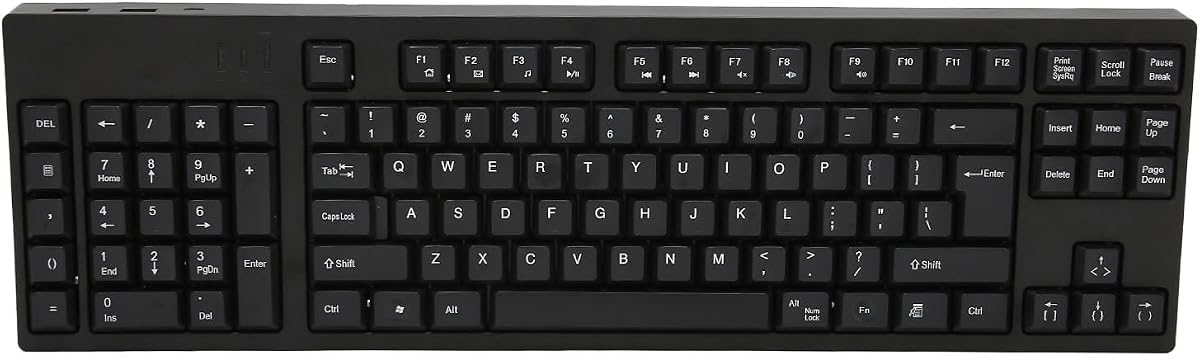

The RK ROYAL KLUDGE L98 stands out as a comprehensive solution for left-handed gamers seeking a full-size experience with ergonomic benefits. Its 4.6 rating reflects strong user satisfaction with the unique Southpaw numpad placement and high-quality build materials.
We may earn a commission when you buy through this link, at no additional cost to you.
Its gasket structure combined with PBT keycaps delivers a premium typing feel that reduces vibrations significantly. The five-layer sound-dampening system ensures a quiet environment while the tri-mode connectivity allows seamless switching between wireless and wired setups.
While the massive 8000 mAh battery offers exceptional longevity, the physical size might be a consideration for smaller desks. However, the freedom to move the mouse without hitting a numpad on the right side is a massive ergonomic advantage for many users.
This keyboard is ideal for gamers who need both speed and comfort during long sessions. The hot-swappable design allows for future customization making it a versatile choice for enthusiasts who want to tailor their setup over time.
Relocating the numpad to the left frees up right side space for mouse movement reducing physical strain during intense gaming sessions.
The combination of gasket mounting and multiple damping layers creates a satisfying acoustic profile that minimizes hollow cavity noise effectively.
We may earn a commission when you buy through this link, at no additional cost to you.
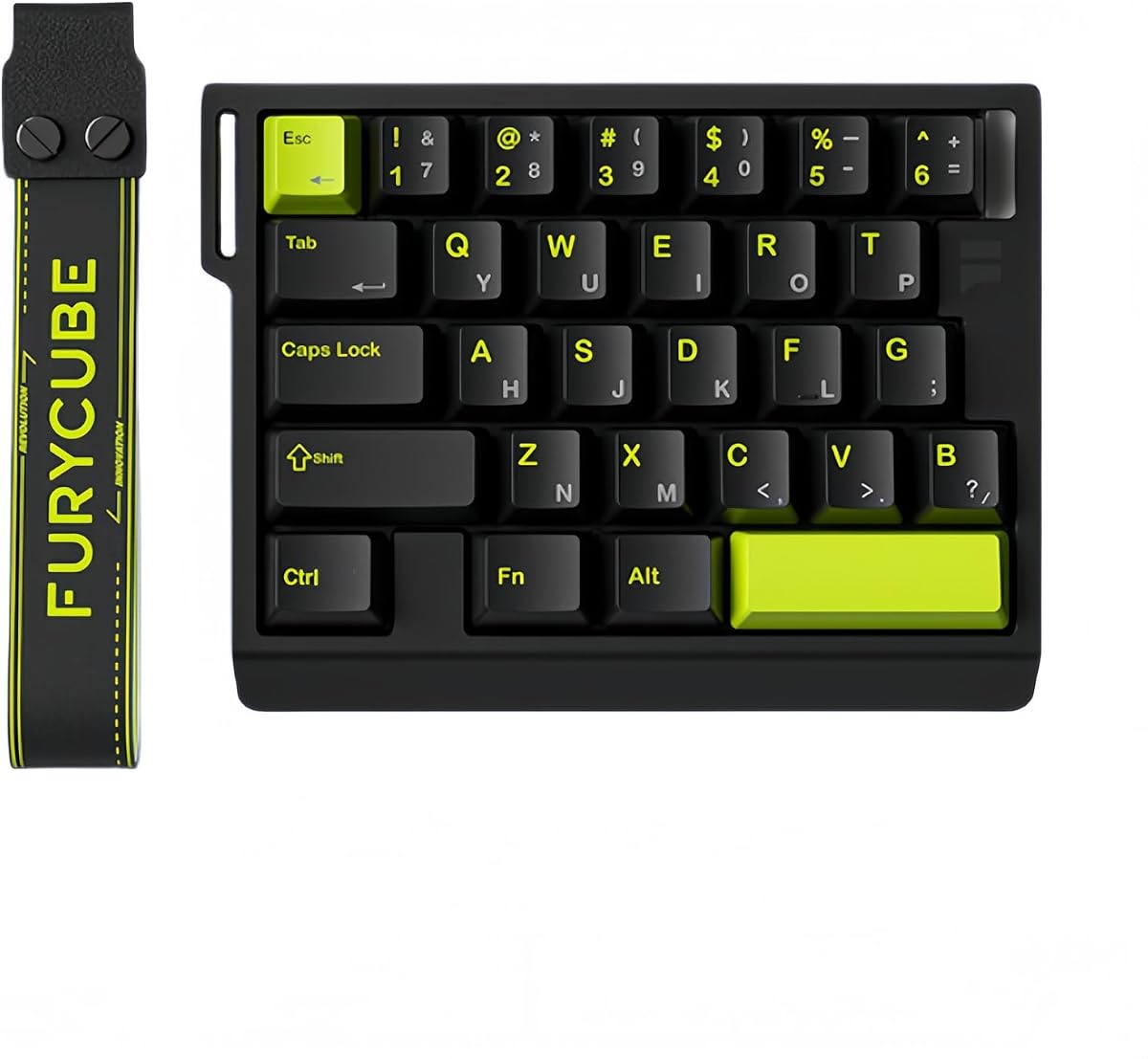
The RedThunder One Handed Gaming Keyboard offers a functional entry point for players looking to save desk space without sacrificing essential controls. With a 4.4 rating it is praised for its portability and straightforward plug-and-play setup across various operating systems.
We may earn a commission when you buy through this link, at no additional cost to you.
Its 35-key anti-ghosting layout supports almost all PC games while the built-in game chip ensures fast response speeds. The macro recording feature allows users to automate complex sequences which is particularly useful for strategy games or repetitive tasks.
While the RGB lighting adds visual flair the build quality is typical for budget devices. The ergonomic wrist rest helps reduce fatigue but the compact nature means fewer keys are available compared to full keyboards limiting some flexibility.
This device is perfect for travelers or those with very limited desk space. It provides a reliable alternative to a standard keyboard for basic gaming needs without the cost or complexity of high-end mechanical alternatives.
A dedicated internal chip accelerates input processing to ensure smooth gameplay and rapid response times for competitive gaming scenarios.
Users can program custom key sequences to automate actions increasing efficiency during long gaming sessions without needing external software.
We may earn a commission when you buy through this link, at no additional cost to you.
The AZERON Cyborg II is a high-end solution designed for players who demand precision control and deep customization. Its 4.3 rating reflects the advanced features like the Hall Effect thumbstick that eliminate stick drift common in traditional joysticks.
We may earn a commission when you buy through this link, at no additional cost to you.
This keypad replaces the traditional keyboard for left-hand use while keeping the mouse on the right. The analog thumbstick allows for 360-degree movement in compatible games offering a unique advantage over standard WASD setups for precise movement control.
Although the software allows for extensive tweaking of sensitivity and dead zones the learning curve can be steep. Additionally the medium-sized design might not fit every hand size comfortably meaning users should verify dimensions before purchasing to ensure fit.
It is best suited for dedicated gamers willing to invest time in setup for performance gains. The modular design ensures longevity allowing for future updates or component swaps to keep the device relevant as technology evolves.
Magnetic sensors eliminate physical contact wear resulting in zero stick drift and consistent analog input accuracy over time.
Six control layouts can be stored directly on the device allowing quick switching between different game profiles without software access.
We may earn a commission when you buy through this link, at no additional cost to you.
The AZERON Keyzen elevates the one-handed gaming experience with premium materials like Cherry MX switches and a 3D-printed modular structure. It earns its high rating through robust build quality and the flexibility to tailor every aspect to user preferences.
We may earn a commission when you buy through this link, at no additional cost to you.
With 32 fully mappable keys and a drift-free Hall-Effect joystick it covers both keyboard and controller inputs seamlessly. The ergonomic design includes interchangeable palm rests and swappable keycaps ensuring comfort during marathon gaming sessions.
While the cost is high the durability and upgradeability justify the investment for serious enthusiasts. The onboard profiles and unlimited software customization mean you can store multiple configurations instantly without needing external apps constantly connected.
This model is the ultimate choice for users who want a bespoke setup that lasts. The combination of mechanical switches and analog control offers a versatility that few other single-handed devices on the market can match today.
Genuine Cherry MX switches provide consistent tactile feedback and long-term reliability that surpasses standard membrane key options significantly.
Components are replaceable allowing users to update parts over time without needing to buy an entirely new device unit.
We may earn a commission when you buy through this link, at no additional cost to you.
The AJAZZ AK029 brings professional-grade magnetic switch technology to a budget-friendly one-handed keyboard. Its 4.5 rating is driven by its impressive 8KHz polling rate and rapid trigger features that appeal to competitive FPS players.
We may earn a commission when you buy through this link, at no additional cost to you.
Features like SOCD and DKS technologies allow for advanced movement techniques such as instant counter-strafing. The aluminum alloy plate and five-layer acoustic structure ensure the device feels solid and performs quietly during intense gaming sessions.
While the wired connection limits portability it guarantees zero latency which is crucial for esports. The compact 29-key layout saves space but might lack certain keys for complex macros compared to larger models in the market.
This keyboard is perfect for gamers prioritizing performance and durability over wireless convenience. It offers a rare combination of rapid trigger technology and premium materials at a price point that makes it accessible to many gamers.
Magnetic switches allow keys to reset instantly when lifted enabling faster movement adjustments than traditional mechanical switch designs.
SOCD and DKS technologies simplify complex inputs binding multiple actions to single keystrokes for streamlined in-game control schemes.
We may earn a commission when you buy through this link, at no additional cost to you.
This keyboard focuses heavily on health and productivity for left-handed professionals who spend long hours typing. It features a patented Natural_A key shape designed to reduce strain on the back and shoulders while improving overall posture.
We may earn a commission when you buy through this link, at no additional cost to you.
The layout places the numeric keypad on the left side freeing up right-hand space for mouse use. It includes multimedia hotkeys and supports both Windows and Mac systems ensuring compatibility across various work environments without needing complex drivers.
While it is not marketed specifically for gaming it provides a comfortable typing experience that can support casual play. The design aims to eliminate Repetitive Strain Injury which is a common issue for those using standard keyboards for extended periods.
It is an ideal choice for office workers or accountants who need an ergonomic solution without sacrificing functionality. The simple plug and play feature means you can start using it immediately upon connecting to your computer system.
The unique key structure aligns with natural hand movements to significantly reduce physical strain on shoulders and back during use.
Eight dedicated hotkeys provide quick access to media controls and shortcuts enhancing efficiency for daily business tasks and work.
We may earn a commission when you buy through this link, at no additional cost to you.
The Keychron C0 HE offers a modern approach to customization with a web-based configurator that removes the need for heavy software installations. Its 4.2 rating reflects strong performance in competitive titles like Valorant and CS2 due to its magnetic switches.
We may earn a commission when you buy through this link, at no additional cost to you.
With an 8K polling rate and rapid trigger support it delivers ultra-low latency for precise movement control. The 35-key layout keeps essential commands within reach making it ideal for MMO and MOBA players who rely on quick skill access.
While it supports both Windows and macOS seamlessly users should note it is wired only. The per-key RGB lighting adds aesthetics but the lack of downloadable software might limit advanced macro features compared to models requiring local apps.
This keypad is excellent for users who prefer browser-based tools and cross-platform flexibility. Its focus on streaming and content creation features also makes it a versatile tool beyond just gaming scenarios.
Adjust settings directly through a browser interface eliminating software installation and ensuring compatibility across multiple operating systems easily.
Trigger OBS scenes and manage streaming shortcuts easily making it a great addition for streamers needing one-handed access.
We may earn a commission when you buy through this link, at no additional cost to you.
This model offers a full 109-key layout specifically rearranged for left-handed users who still need a complete typing experience. It holds a perfect 5.0 rating from users who appreciate its simplicity and ergonomic benefits for daily computer use.
We may earn a commission when you buy through this link, at no additional cost to you.
The design allows the left hand to operate the numeric keypad while keeping the right hand free for mouse tasks. It is made of durable ABS material that provides a stable and accurate typing experience suitable for business or design work.
Although it uses a Micro USB connection rather than a modern USB-C it remains plug and play without drivers. The additional USB interfaces allow for peripheral devices adding convenience for users who need multiple connections on their desktop.
It is best suited for professional environments where productivity and ergonomic support are priorities. The straightforward design ensures it works well for accountants and designers needing full key access without unnecessary gaming features.
The 109-key layout ensures no shortcuts are lost allowing full productivity for standard typing and data entry tasks.
Two extra USB interfaces allow convenient connection of extra devices without needing additional hubs for peripherals and accessories.
We may earn a commission when you buy through this link, at no additional cost to you.
The FKZ M30HE distinguishes itself with a hot-swappable design that allows users to change magnetic switches without soldering. Its 4.0 rating points to solid features like adjustable actuation points that let users tailor sensitivity for different games.
We may earn a commission when you buy through this link, at no additional cost to you.
With dynamic keystroke technology one key can bind four distinct operations which enhances efficiency during complex gameplay. The north-facing LEDs improve visibility and ensure lighting effects look vibrant even with different keycap styles or angles.
While the web driver allows for macro customization and actuation adjustments the average rating suggests room for improvement in build consistency. However the portability and specialized gaming features still make it a strong contender for budget-conscious competitive players.
This keyboard is ideal for those who want to experiment with different switch types easily. The combination of magnetic technology and hot-swap capability offers significant flexibility for users looking to optimize their setup over time.
Sensitivity can be adjusted down to 0.01mm allowing players to customize key depth for faster or more deliberate inputs.
LEDs point upward to maximize light through keycaps ensuring better visibility during gameplay with dark or transparent caps.
We may earn a commission when you buy through this link, at no additional cost to you.
The A4tech Ergonomic Left Handed Keyboard is another solid option for professionals prioritizing health and comfort. With a 4.3 rating it is recognized for its ability to reduce RSI and carpal tunnel risks through its patented natural key design.
We may earn a commission when you buy through this link, at no additional cost to you.
It includes eight multimedia hotkeys that streamline common tasks and improve workflow efficiency. The design specifically targets shoulder and back strain making it a great choice for accountants or business professionals who type frequently.
While it lacks gaming features it provides a reliable and stable wired connection for daily work. The simple black design fits into office environments without distraction while the ergonomic benefits remain the primary selling point for this model.
This keyboard is best for individuals looking to mitigate physical discomfort during work hours. It serves as a practical tool for maintaining health while ensuring that typing productivity remains high throughout the day.
The ergonomic layout reduces stress on the wrists and shoulders helping prevent long-term repetitive strain injuries effectively.
Eight hotkeys provide easy access to volume and media controls enhancing daily productivity without breaking workflow momentum.
We may earn a commission when you buy through this link, at no additional cost to you.
Selecting the right left-handed keyboard depends on balancing ergonomics with gaming performance. We break down the key factors to consider before making your final decision.
Decide whether you need a full numpad layout like the RK L98 or a compact keypad like the RedThunder. A full layout is great for productivity but a smaller keypad saves desk space for mouse movement.
Consider the number of keys available for macros and essential commands to ensure your specific gaming genre needs are met effectively.
Traditional mechanical switches offer tactile feedback while Hall Effect magnetic switches enable rapid trigger for faster movement adjustments. Competitive players often prefer magnetic switches for their precision.
Look for hot-swappable options if you plan to experiment with different switch feels or want to upgrade components later without soldering.
Most gaming keypads use wired connections to minimize latency but wireless options like the RK L98 offer flexibility. Ensure the connection type fits your setup constraints and performance needs.
Bluetooth or 2.4GHz wireless is useful for multi-device setups but a wired connection guarantees the lowest possible response time for competitive play.
Check for adjustable palm rests and wrist support to prevent fatigue during long sessions. Materials like aluminum or durable ABS ensure the keyboard withstands heavy use over time.
A gasket-mounted structure can improve comfort and sound quality by reducing vibration and providing a softer typing feel.
Some models require software for macros while others use web-based configurators or onboard profiles. Ensure the customization method aligns with your preference for local or cloud settings.
Programmable keys and macro support are essential for MMO players who need to execute complex commands quickly and efficiently during gameplay.
High polling rates like 8KHz ensure that your inputs are registered instantly by the computer. This is critical for competitive shooters where every millisecond counts.
Rapid trigger technology allows keys to reset immediately upon lifting your finger which significantly improves movement speed and responsiveness in games.
Prices vary significantly from budget-friendly options to premium models. Determine a spending range that balances necessary features with long-term durability and reliability.
Invest in higher-end features like magnetic switches or modular builds if you plan to use the device heavily for several years.
Verify that the keyboard supports your operating system whether it is Windows macOS or Linux. Some models may require specific drivers to unlock full functionality.
Check for plug-and-play support to avoid complicated setup processes if you want immediate use out of the box.
To get the most out of your new device start by mapping your most frequently used keys to easily reachable positions. Adjust the actuation points if your keyboard supports it to match your preferred sensitivity and speed.
Keep your keyboard clean by regularly wiping down the keycaps to prevent dust buildup which can affect performance. Avoid eating or drinking near the device to protect the switches from spills and debris.
Update the firmware regularly using the manufacturer's software to ensure you have the latest features and bug fixes. Proper care will extend the lifespan of your device and maintain optimal performance over time.
Yes, models like the RK L98 are designed with ergonomic advantages that appeal to right-handed users too. The layout frees up space on the right for mouse movement which can be comfortable regardless of hand preference.
Rapid trigger allows keys to reset immediately when lifted rather than waiting for a physical travel point. This feature is especially beneficial in competitive FPS games for quicker direction changes and movement.
Many models like the Keychron C0 HE support macOS seamlessly. However it is best to check specific compatibility details in the product description to ensure full driver support and functionality.
Some models support onboard profile storage allowing you to switch layouts directly on the device. Others may require software to change keymaps which depends on the manufacturer and model features.
Mechanical switches use physical contact while magnetic switches use Hall Effect sensors to detect key presses. Magnetic switches typically offer faster response times and durability since there is no physical wear.
Yes options like the RK ROYAL KLUDGE L98 offer tri-mode connectivity including wireless. This provides flexibility to use the keyboard across multiple devices without being tethered to a cable.
Look for models with built-in sound dampening layers like the RK L98 which includes foams and PET films. Using O-rings or custom keycaps can also help further reduce typing noise effectively.
While not essential for all games a numpad can be useful for MMOs or strategy titles that require many bindable commands. A left side placement can free up space for better mouse movement.
We have explored ten distinct options ranging from the RK ROYAL KLUDGE L98 for full functionality to the AZERON Keyzen for premium modular needs. Each model offers unique strengths tailored to different player priorities and preferences.
When making your choice prioritize ergonomic design and switch technology that fits your play style. Ensure you check compatibility with your operating system to avoid any setup issues later.
Remember that specific features and availability can change so verify current details before purchasing. With the right setup you can enjoy a comfortable and efficient gaming experience optimized for left-handed use.