
Lenovo V15 Business Laptop
4.3Editor score
Affordable Price Point
Wi-Fi 6 Connectivity
Windows 11 Home S Mode
This comprehensive guide compares the top 10 Lenovo Laptop for Home Use models available in October 2026 to help you find the perfect device for your daily
Finding the right laptop for home use can be challenging with so many options available on the market today. You need a device that balances performance, portability, and affordability to handle everyday tasks efficiently. Lenovo has established itself as a reliable brand offering diverse models suitable for students, professionals, and casual users alike.
Our team has carefully analyzed ten distinct Lenovo laptops to determine which ones offer the best value for home environments. We evaluated processor speed, memory capacity, display quality, and connectivity options to ensure each pick meets modern computing standards. This list includes budget-friendly picks and more robust models designed for heavier workloads and extended use.
Each product entry below highlights key specifications, pros and cons, and specific use cases to help you make an informed decision. Keep in mind that prices and availability can fluctuate frequently based on market demand and seasonal promotions. We recommend verifying the latest details on the product pages before finalizing your purchase to ensure you get the best deal.
4.3Editor score

4.6Editor score

5.0Editor score
The following table provides a side-by-side comparison of all ten Lenovo laptops reviewed in this guide to help you quickly identify the model that best fits your specific requirements and budget constraints.




This Lenovo laptop stands out as the top recommendation for home users seeking a balance of performance and value. It holds an impressive 4.6 rating from verified buyers who appreciate its smooth operation for daily tasks. The device combines a capable processor with sufficient memory to handle web browsing, streaming, and document editing without lag.
We may earn a commission when you buy through this link, at no additional cost to you.
The 15.6-inch Full HD display delivers crisp visuals perfect for entertainment and productivity work. With anti-glare coating and TÜV Low Blue Light certification, it ensures comfortable viewing during long sessions. The inclusion of a 1-year Microsoft 365 subscription adds significant value by providing immediate access to essential office applications and cloud storage.
While the 128GB storage is modest for modern standards, the fast UFS technology ensures quick system responsiveness. Users can easily expand storage via the SD card reader or cloud services. The durable construction and military-grade testing mean this laptop can withstand the rigors of daily family use and travel.
Ideal for students and remote workers, this model offers everything needed to stay productive at home. The privacy shutter on the webcam and robust security features provide peace of mind. We highly recommend this device for anyone needing a reliable, ready-to-use laptop for home office or learning tasks.
The bundled subscription allows you to create documents and manage emails immediately without additional costs.
Military-grade testing ensures the chassis can handle drops and bumps common in busy households.
We may earn a commission when you buy through this link, at no additional cost to you.
This model offers a compelling alternative to the top pick with nearly identical specifications at a competitive price. It features the same Intel N150 processor and 8GB RAM to ensure smooth multitasking for home users. The 15.6-inch display provides ample screen real estate for managing multiple windows and applications efficiently.
We may earn a commission when you buy through this link, at no additional cost to you.
The Arctic Grey finish gives this laptop a sleek and professional appearance suitable for any setting. Built-in privacy features like the camera shutter protect your data during video calls. The integration of Windows 11 Home offers a modern interface that is intuitive for both tech-savvy users and beginners.
Like its counterpart, storage is limited but compensated by fast access speeds and cloud integration options. The laptop is lightweight and portable making it easy to move between rooms or take on trips. Connectivity options include multiple USB ports and HDMI for connecting external monitors or peripherals.
Buyers looking for a cost-effective solution without sacrificing core performance will find this model ideal. It supports essential home computing needs from online classes to entertainment streaming. We suggest pairing it with external storage if you plan to store large media files locally.
The Arctic Grey design blends well in home offices and study areas for a polished look.
Dual-array microphones and privacy shutter ensure clear and secure virtual meetings.
We may earn a commission when you buy through this link, at no additional cost to you.
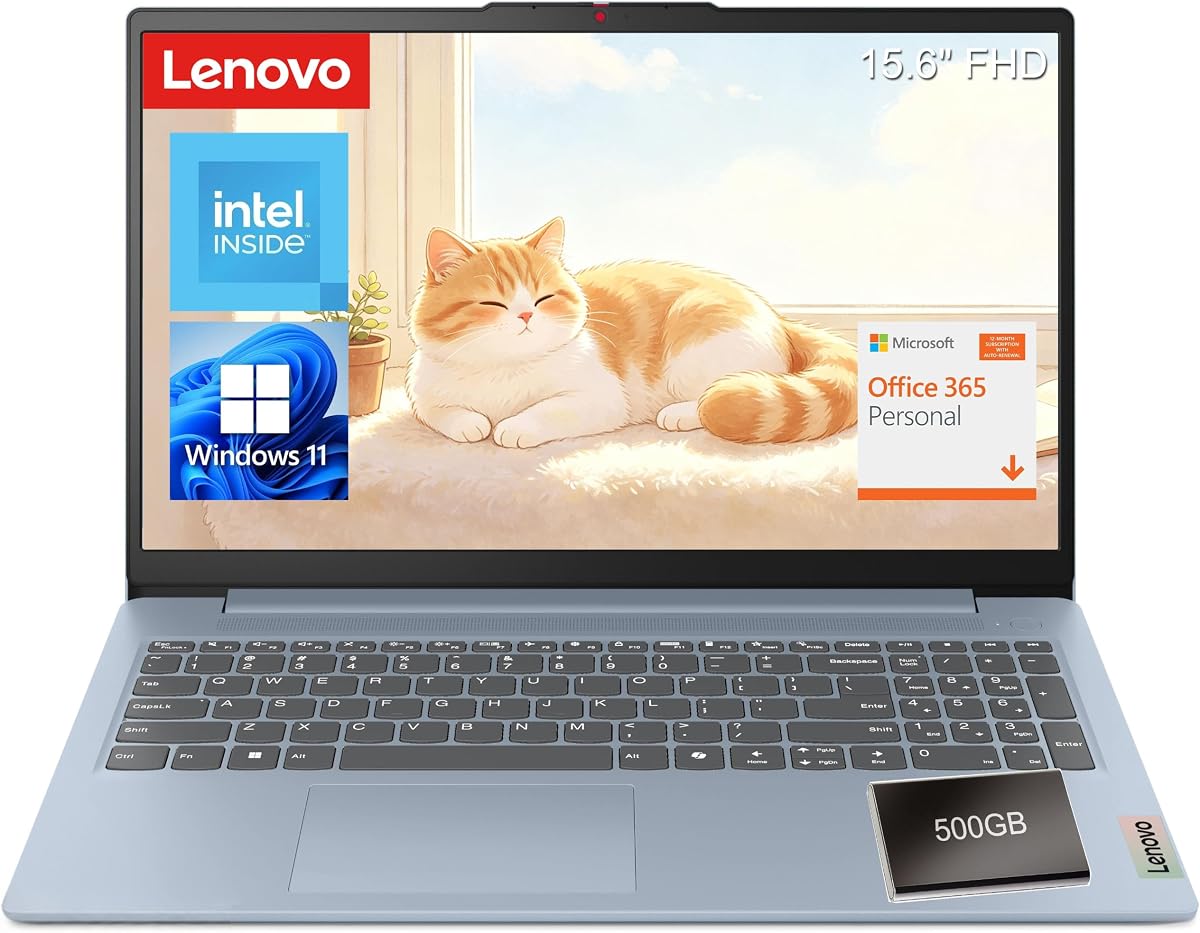
This 2026 edition laptop addresses the storage limitation found in many budget models by including a 500GB external hard drive. It maintains the powerful N150 processor and 8GB RAM to handle daily computing tasks with ease. The package is designed for users who need immediate extra space for files and media.
We may earn a commission when you buy through this link, at no additional cost to you.
The display quality is sharp with an anti-glare coating that reduces eye strain during long usage. Dolby Audio enhanced speakers provide rich sound for movies and music without needing external headphones. The laptop is lightweight and durable with military-grade testing ensuring it can handle everyday wear and tear.
Connectivity options are comprehensive with Wi-Fi 6 and multiple USB ports for connecting various devices. The pre-installed Windows 11 and Office 365 make it ready to use right out of the box. This bundle approach saves users from having to purchase additional storage separately later on.
It is an excellent choice for families or students who need substantial storage for projects and media. The included accessories add significant value to the overall purchase price. We recommend this model for those prioritizing storage capacity alongside standard performance needs.
The external drive provides instant additional space for backups and large file collections.
Dolby Audio tuning ensures clear and vibrant sound for all your entertainment needs.
We may earn a commission when you buy through this link, at no additional cost to you.
This laptop emphasizes productivity by bundling a full year of Microsoft Office 365 with the device. It features the reliable Intel N150 processor and 8GB RAM to ensure smooth operation for work documents and spreadsheets. The design focuses on user experience with a comfortable keyboard and responsive touchpad.
We may earn a commission when you buy through this link, at no additional cost to you.
The 15.6-inch display offers clear visuals ideal for reading documents and browsing the web. Its slim profile and lightweight build make it easy to carry around the house or to local cafes. The Frost Blue finish adds a touch of style while the durable materials ensure longevity.
Security is a priority with firmware TPM 2.0 and camera privacy features to protect personal data. Connectivity includes Wi-Fi 6 and versatile ports for connecting external displays and storage. The battery life is optimized for all-day use making it suitable for extended work sessions.
Best suited for home office workers and students who rely heavily on Office applications. The included subscription removes the immediate cost of software licenses and streamlines setup. We recommend this for anyone needing a reliable machine specifically for document creation and management.
With Office pre-installed you can start working on assignments or projects immediately.
TPM 2.0 and privacy shutters keep your information safe from unauthorized access.
We may earn a commission when you buy through this link, at no additional cost to you.
This model represents the most affordable entry point into the lineup making it accessible for budget-conscious buyers. It uses the efficient N100 processor and 4GB RAM to handle basic tasks like browsing and streaming. The laptop is designed to be portable and durable for everyday use in various environments.
We may earn a commission when you buy through this link, at no additional cost to you.
The 15.6-inch screen provides a comfortable viewing area for content consumption and light work. Anti-glare coating helps reduce strain during long reading sessions. The S Mode operating system enhances security by only allowing apps from the Microsoft Store which prevents accidental malware installation.
Despite the lower RAM capacity users report smooth performance for essential applications. The inclusion of Microsoft 365 adds value by providing necessary tools for education and work. Build quality is solid with military-grade testing ensuring it can survive accidental bumps and drops.
Perfect for students or secondary devices for simple home tasks. It offers a great balance of cost and functionality for those who do not need high-end specs. We advise users to check app compatibility before installing software outside the Store.
Windows S Mode ensures a secure environment for casual users and children.
At just 3.42 lbs it is easy to carry anywhere in the home or school.
We may earn a commission when you buy through this link, at no additional cost to you.
This laptop introduces an AI Copilot hotkey for quick access to productivity tools and generative AI features. It maintains strong performance with 8GB RAM and fast storage to support modern workflows. The design focuses on utility with a durable build and clear display for various tasks.
We may earn a commission when you buy through this link, at no additional cost to you.
The 15.6-inch screen offers vibrant visuals suitable for both work and entertainment. Users appreciate the responsive keyboard and touchpad for navigation and typing. The laptop supports Wi-Fi 6 ensuring reliable internet connections for video calls and streaming.
The AI integration provides a unique advantage for users looking to streamline their workflow. It can help draft emails or summarize documents quickly with the press of a button. The overall build quality and reliability match other models in the series.
Ideal for users interested in leveraging AI for home projects or learning. It provides a modern feature set at a reasonable price point. We suggest this for those wanting to experience the latest in productivity assistance.
The dedicated hotkey lets you launch Copilot tools without digging through menus.
Consistent speed across apps ensures smooth operation for daily use.
We may earn a commission when you buy through this link, at no additional cost to you.
This edition stands out with a larger 256GB NVMe SSD offering significantly more space than others. It also includes a Gigabit Ethernet port for stable wired network connections which is rare in this category. The laptop is built for reliability and performance with quality components.
We may earn a commission when you buy through this link, at no additional cost to you.
The display is clear and comfortable for extended viewing with anti-glare properties. Connectivity is robust with multiple USB types and HDMI for versatile setups. The physical security slot allows you to secure the device to a desk to prevent theft in shared spaces.
Performance is smooth thanks to the combination of fast storage and 8GB RAM. The build quality is tested to military standards ensuring durability for business environments. This model is particularly useful for users who require wired internet stability or ample local storage.
Best for home offices that need reliable networking and storage capacity. The TCO certification also indicates environmental compliance which matters to eco-conscious buyers. We recommend this for those who value stability and connectivity options over ultra-slim designs.
The Ethernet port ensures consistent speeds for critical tasks and large downloads.
256GB space allows for more applications and files without external drives.
We may earn a commission when you buy through this link, at no additional cost to you.
This everyday laptop is designed for simplicity and efficiency without unnecessary complications. It handles common tasks like web browsing and document editing with ease due to modern storage and Wi-Fi 6. The design prioritizes portability and ease of use for non-technical users.
We may earn a commission when you buy through this link, at no additional cost to you.
The display is bright and large enough for comfortable reading and watching videos. It includes essential privacy features and security chips to protect your data from threats. The battery life is sufficient for a day of casual use around the house or school.
While RAM is modest the system is optimized to prevent lag during normal operations. It is a straightforward solution for households needing a secondary or backup computer. The inclusion of Office 365 makes it a complete package for productivity right out of the box.
Ideal for seniors or anyone seeking a no-fuss computing experience. It avoids complex features and focuses on core functionality. We suggest this for users who need a reliable machine for email and media consumption.
Designed to work smoothly without technical knowledge or complicated settings.
Includes essential software so you can start working immediately without setup.
We may earn a commission when you buy through this link, at no additional cost to you.
This IdeaPad model focuses on a slim profile that is easy to transport in a backpack. It offers solid performance with 8GB RAM and fast SSD storage for quick app launches. The design is sleek and fits well in any home environment or classroom setting.
We may earn a commission when you buy through this link, at no additional cost to you.
The display quality is good for daily work and entertainment needs. Users appreciate the Arctic Grey finish which adds a premium feel to the build. The system runs Windows 11 Home providing access to modern features and security updates.
The laptop is ready for use with bundled software and drivers included. It handles multitasking well enough for most home scenarios without issues. Port selection is standard but sufficient for most peripherals.
Great for users who prioritize portability and style. It is a reliable option for students moving between classes or rooms. We recommend this for those wanting a lightweight device without compromising too much on performance.
The slim chassis makes it easy to carry everywhere you go in your home.
Windows 11 ensures you have the latest features and safety protections.
We may earn a commission when you buy through this link, at no additional cost to you.
This bundle offers the most comprehensive package with an external CD/DVD drive and a mouse included. It is perfect for users who need to read physical media or prefer a tactile input device. The inclusion of a 256GB SD card solves storage concerns immediately.
We may earn a commission when you buy through this link, at no additional cost to you.
The laptop itself is powerful with 8GB RAM and fast storage for smooth operation. Users rate it highly for its ease of setup and reliability. It supports all modern connectivity needs including Wi-Fi 6 and USB-C for versatile usage.
The Office 365 subscription ensures you have tools for essays, spreadsheets, and presentations. The build quality is sturdy enough to handle daily tasks around the home office. This model removes the guesswork from setting up a complete workspace.
Best for those who want a full solution without buying accessories separately. The external drive is a rare feature that adds significant utility. We recommend this for families or students who need every possible tool ready out of the box.
Everything you need is included so you can set up your desk instantly.
External drive and SD card ensure you can access and save all file types.
We may earn a commission when you buy through this link, at no additional cost to you.
Selecting the right laptop involves understanding your specific needs and matching them with the hardware capabilities available.
The processor determines how well the laptop handles tasks like browsing and editing. Intel N-series processors like N100 and N150 are efficient for daily use and provide good battery life. Look for models with at least 4 cores to ensure smooth multitasking without delays.
Choose a processor that matches your workload to avoid paying for power you do not need.
Memory or RAM allows you to run multiple applications simultaneously without slowdowns. 8GB is the sweet spot for home use allowing web browsers and office apps to run comfortably. 4GB options are budget-friendly but may struggle with heavy browser tab usage.
Prioritize 8GB if you plan on keeping many tabs open or running multiple programs.
Solid state storage like UFS or NVMe SSD offers faster boot times than traditional hard drives. 128GB is standard for basic systems but you may need external drives for media collections. Look for models with SD card readers if you want expandable storage options.
Select storage with faster speeds to ensure the system feels responsive during daily use.
A 15.6-inch Full HD screen provides enough space for documents and video streaming. Anti-glare coatings are essential for reducing eye strain during long work sessions. Brightness and color accuracy matter if you watch videos or work on visual tasks.
Look for anti-glare and 1920×1080 resolution to ensure comfortable viewing.
Modern laptops include USB-C and USB-A ports for connecting peripherals and external drives. HDMI ports are useful for connecting to TVs or monitors for presentations. Wi-Fi 6 ensures you get the fastest wireless speeds from your home router.
Check that the laptop has the specific ports you need for your peripherals.
Privacy shutters on webcams protect your video feed when not in use. TPM 2.0 chips help secure data against unauthorized access and theft. Physical security slots allow you to lock the device to furniture in shared spaces.
Choose a model with hardware privacy features to keep your data safe.
Fast charging capabilities ensure the laptop is ready quickly when you need it. Battery life varies by model but most should last a typical work session. Consider USB-C charging if you want to use a single charger for other devices.
Look for 65W chargers to ensure the battery fills up quickly.
Military-grade testing standards like MIL-STD-810H indicate a rugged build quality. The weight of the laptop affects how easy it is to move around the home. A lightweight design is better if you plan to carry it to different rooms or locations.
Prioritize durable construction if the laptop will be moved frequently by others.
To ensure your laptop lasts for years keep it in a cool and dry environment. Avoid placing it on soft surfaces like beds or couches that can block airflow vents. Use a hard flat surface for working to maintain proper ventilation and prevent overheating.
Keep the display clean by using a microfiber cloth to remove dust and fingerprints. Do not spray liquids directly on the screen but rather on the cloth before wiping. This prevents damage to the sensitive panel layers and maintains clear visibility.
Regularly update the software and drivers to keep performance optimized. Restart the device periodically to clear memory and apply updates. A simple restart can often resolve minor software glitches and improve overall speed.
Yes most models in this lineup are designed specifically for students and online classes. They include webcams, microphones, and enough RAM to handle video conferencing software smoothly. You can run multiple study tabs and documents without lag during lessons.
Most of the top models include a 1-year subscription to Microsoft 365 Personal. This gives you access to Word, Excel, and PowerPoint right out of the box. You will need to sign in with a Microsoft account to activate these features after purchase.
Most of these models have soldered RAM and fixed storage which means internal upgrades are not possible. However they all feature SD card readers that allow you to add external storage easily. You can also use USB drives to store large files and free up internal space.
Yes the majority of these laptops support Wi-Fi 6 for faster wireless speeds. This technology ensures stable connections for video calls and streaming. It is compatible with older routers but provides better performance on newer Wi-Fi 6 networks.
Most of the models in this comparison feature non-backlit keyboards to save battery life. This is standard for budget-friendly laptops but may be difficult to use in dim lighting. If a backlit keyboard is essential for you we recommend checking specific premium configurations.
They are designed for everyday tasks rather than heavy gaming so performance will be limited. Basic 2D games and older titles should run well without issues. For modern 3D gaming you would need a dedicated graphics card which these models do not have.
Our review highlights the Lenovo Business 15.6 FHD Laptop as the top overall pick for most home users. It balances performance durability and essential features like Office 365 perfectly. The V15 Business model offers the best value for those on a strict budget.
When choosing the right model prioritize your most frequent tasks such as typing or streaming. Ensure the storage and memory align with your needs to avoid future limitations. Consider the bundle options if you need immediate accessories like a mouse or external drive.
Prices and availability for these laptops can change quickly so check the current listings before buying. We hope this guide helps you find a reliable device that fits your home environment and budget. Your new laptop will serve as a powerful tool for work learning and entertainment for years.