
ASRock DeskMini X300 2.5G Series
4.2Editor score
Ultra compact 1.92L design
AM4 socket versatility
Triple display support
Explore the top barebone PCs with AMD processors for 2026. Our guide compares specs, ports, cooling, and performance to help you choose the right DIY desktop.
Barebone PCs with AMD processors offer a flexible foundation for custom builds. These systems let you choose your own memory and storage while enjoying powerful integrated graphics and efficient architectures.
We evaluated ten leading models based on processor performance, expansion options, connectivity, and cooling. Each unit supports Ryzen CPUs and includes essential ports for modern workloads and creative tasks.
Every pick highlights key specs and real-world strengths. Prices and availability change frequently so verify current listings before buying. This guide ensures you find a kit matching your specific needs.
4.2Editor score

4.0Editor score

3.1Editor score
This table compares all ten barebone PCs side by side. Check each model's key specs to find the right fit for your budget and performance requirements.





The AOOSTAR MACO delivers top performance with AMD Ryzen 7 PRO 8845HS and Radeon 780M graphics. It is rated well for multitasking and gaming needs.
We may earn a commission when you buy through this link, at no additional cost to you.
This mini PC excels thanks to Zen 4 architecture and 16 TOPS AI performance. The OCuLink port allows external GPUs with minimal loss compared to USB4.
You must buy RAM and SSD separately. The compact size limits expansion but the cooling handles thermal loads well.
Choose this if you need high-speed connectivity and strong iGPU performance. It fits home offices and gaming setups.
Radeon 780M supports AAA gaming and 4K editing efficiently.
Dual USB4 and OCuLink enable triple screen and GPU expansions.
We may earn a commission when you buy through this link, at no additional cost to you.
This GEM12+ model focuses on productivity with quad 4K screen support. It carries the same powerful Ryzen 7 PRO 8845HS processor.
We may earn a commission when you buy through this link, at no additional cost to you.
Vapor Chamber cooling keeps temps low during heavy loads. OCuLink helps GPU expansion while freeing M.2 slots for storage.
Barebone kit means no OS SSD memory. The BIOS has silent balanced and performance modes.
Ideal for traders or designers needing multiple monitors. It handles video editing and rendering.
Triple screen connectivity supports complex workflows efficiently.
Vapor Chamber spreads heat evenly across the chassis.
We may earn a commission when you buy through this link, at no additional cost to you.
GEM12+ PRO adds fingerprint recognition for quick access. It retains the Ryzen 7 PRO 8845HS power and OCuLink support.
We may earn a commission when you buy through this link, at no additional cost to you.
The unit supports up to 128GB RAM and 8TB storage. Energy-saving features reduce power use by up to 20 percent.
Barebone means you buy OS and RAM. BIOS offers silent and performance modes.
Buy this for secure office use. It suits gaming and design.
Fingerprint unlock simplifies login without passwords.
VAT architecture saves 5 to 20 percent energy.
We may earn a commission when you buy through this link, at no additional cost to you.
This kit supports Ryzen 2000 to 5000 CPUs on AM4. The PCIe 3.0 x16 slot allows discrete GPU upgrades.
We may earn a commission when you buy through this link, at no additional cost to you.
It includes a 500W 80+ Bronze PSU for power. DDR4 slots support up to 128GB memory.
Barebone kit lacks CPU and storage. The chassis is compact but not the smallest.
Choose for desktop replacements needing PCIe slots. It handles workstation tasks.
PCIe slot allows discrete GPU for rendering.
500W PSU ensures stability for demanding workloads.
We may earn a commission when you buy through this link, at no additional cost to you.
X1 Lite features AMD Ryzen 7 255 with Radeon 780M. It supports HDMI 2.1 DP 1.4 and USB4 outputs.
We may earn a commission when you buy through this link, at no additional cost to you.
OCuLink allows external GPU. The unit includes a 3-year warranty.
Barebone means buy OS and RAM. The adapter for OCuLink is included.
Pick for creative work or light gaming. It suits multi-monitor setups.
Multiple display ports enable flexible workspace setups.
3-year warranty ensures long term reliability.
We may earn a commission when you buy through this link, at no additional cost to you.
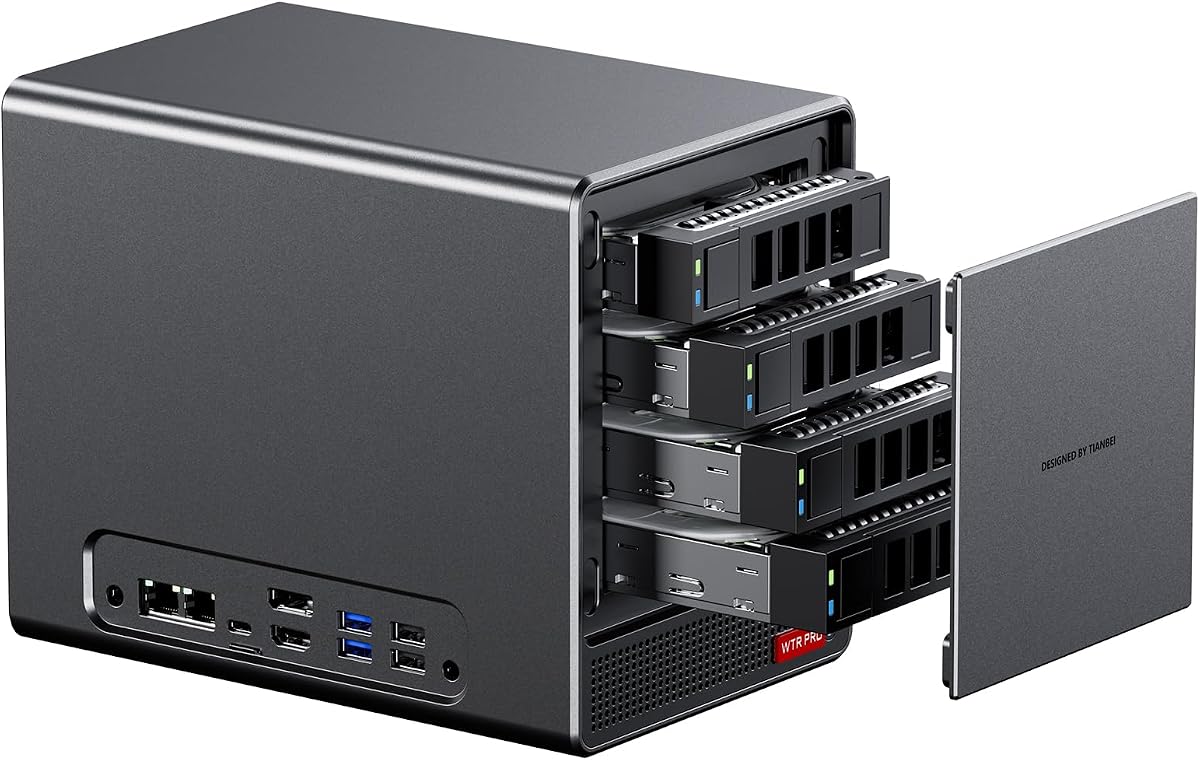
This unit excels as a NAS or soft router. It supports up to 96TB storage with four bays.
We may earn a commission when you buy through this link, at no additional cost to you.
The Ryzen 7 5825U runs quietly and efficiently. It supports triple 4K displays.
Barebone kit requires manual config. SATA power management needs attention in Linux.
Ideal for media servers. It handles file sharing and virtualization.
Multiple drive bays offer massive local storage.
Low power design ensures 24/7 operation.
We may earn a commission when you buy through this link, at no additional cost to you.
DeskMini X300 fits small spaces. It supports AM4 CPUs up to 5000 series.
We may earn a commission when you buy through this link, at no additional cost to you.
Triple displays work via HDMI DP and D-Sub. 2.5G LAN handles networking.
Barebone needs manual install. No PCIe GPU slot.
Choose for home office or light use. It is budget-friendly.
1.92L chassis fits easily on desks.
Triple display allows efficient multitasking.
We may earn a commission when you buy through this link, at no additional cost to you.
PN54 features Ryzen AI 300 Series processors. It includes XDNA2 NPU for 50 TOPS AI workloads.
We may earn a commission when you buy through this link, at no additional cost to you.
Wi-Fi 7 ensures ultrafast wireless. The chassis is ultra thin and toolless.
Barebone means manual setup. High cost may limit appeal.
Buy for AI tasks or modern connectivity. It suits agents and labs.
XDNA2 NPU accelerates AI inference tasks.
Wi-Fi 7 provides next-gen wireless speeds.
We may earn a commission when you buy through this link, at no additional cost to you.
This NAS unit supports 4 SATA plus 2 NVMe drives. It handles Windows Linux and OpenWrt.
We may earn a commission when you buy through this link, at no additional cost to you.
Ryzen 7 5825U ensures stable multitasking. Triple 4K output aids work.
Barebone needs manual install. Power management may require tuning.
Ideal for home servers and media centers. It handles virtualization.
Compatible with Windows and open-source routers.
Dual LAN ensures robust wired connectivity.
We may earn a commission when you buy through this link, at no additional cost to you.
PN54-S1 uses Ryzen 200 Series processors. It features Wi-Fi 7 and Bluetooth 5.4.
We may earn a commission when you buy through this link, at no additional cost to you.
Toolless design simplifies upgrades. It is built for 24/7 reliability.
Barebone means buy OS and RAM. Lower GPU power limits gaming.
Pick for business and home use. It suits light computing needs.
Wi-Fi 7 ensures ultrafast future-proof connectivity.
Toolless chassis allows quick component swaps.
We may earn a commission when you buy through this link, at no additional cost to you.
Selecting a barebone PC requires checking CPU architecture ports and cooling. These factors define performance and upgrade potential.
Check if the kit uses Ryzen 5000 AM4 or 8000/9000 Zen 4. Newer cores offer better AI and graphics.
Always confirm the CPU generation matches your performance needs.
Verify if the model uses DDR4 or DDR5. DDR5 offers higher bandwidth for multitasking.
Ensure slots support your target capacity.
Look for M.2 slots and SATA ports. Some kits allow multiple SSDs and HDDs.
Count total storage bays for your data needs.
Check for USB4 Thunderbolt HDMI DP and LAN. Newer ports enable faster data transfer.
Prioritize models with USB4 if you need 40Gbps speeds.
Integrated Radeon graphics vary by model. Higher-end iGPUs support gaming and editing.
If gaming is key consider models with OCuLink support.
Cooling affects stability under load. Vapor chambers and metal shells help manage heat.
Check cooling details if you plan long work sessions.
Look for Wi-Fi 6e or Wi-Fi 7. These standards offer better range and speed.
Ensure Bluetooth version matches your accessories.
Check warranty length and service options. Some offer 24 or 36 month support.
Choose brands with strong support for peace of mind.
Install compatible RAM and storage before first boot. Insert DDR5 modules firmly and secure M.2 drives with screws.
Connect display and keyboard then power up. Install the OS from USB media and update drivers via AMD tools.
Keep vents clear and clean dust monthly. Use firmware updates to maintain security and stability.
A barebone PC with AMD includes the chassis CPU motherboard and PSU but not RAM storage or OS. You buy these separately and install them yourself.
Yes most barebone kits do not include Windows or Linux. You must install your own system from a USB drive.
DDR5 offers higher bandwidth and is better for multitasking. AM4 systems use DDR4 while Zen 4 kits support DDR5.
OCuLink allows external GPUs with PCIe speeds. It is faster than USB4 and helps gaming performance.
It depends on the motherboard. AM4 boards support many CPUs while newer kits often use soldered processors.
Some models with Radeon 780M graphics handle light to medium gaming well. High-end gaming requires external GPU support.
The top picks like AOOSTAR MACO ASRock DeskMini and ASUS ExpertCenter offer strong performance for different needs.
Prioritize CPU generation and port types based on your tasks. If you need speed choose DDR5 and USB4 models.
Always check current listings for stock and deals. Each model offers unique benefits so match your budget to specs.