
OKI MICROLINE 320 Turbo
4.7Editor score
Reliable 9-pin performance
Fast draft mode output
Affordable maintenance costs
Dot matrix computer printers remain essential for businesses requiring durable, multi-part form printing. These impact devices excel where reliability and continuous operation matter most. Selecting the right model depends on volume needs, connectivity options, and specific application requirements.
We evaluated ten leading dot matrix printers based on speed, duty cycle, connectivity, and overall value. Our analysis focuses on real-world performance metrics and user feedback to ensure accuracy. This list covers options ranging from entry-level to heavy-duty industrial models.
Each pick highlights key strengths and ideal use cases to simplify your decision process. Prices and availability fluctuate frequently so please check current listings before purchasing. We update this guide regularly to reflect the latest market options and manufacturer changes.
4.7Editor score

4.3Editor score

4.8Editor score
As an Amazon Associate we earn from qualifying purchases.
The following table provides a side-by-side comparison of all ten selected dot matrix printers. It highlights essential specifications including pin count, print speed, connectivity options, and duty cycle to help you quickly identify the best fit for your specific workflow requirements.


The Epson LQ-590II stands out as the top choice for businesses needing robust impact printing. With a 4.3 rating, it delivers consistent results for high-volume tasks. Its 24-pin head ensures crisp text and reliable multipart form handling.
We may earn a commission when you buy through this link, at no additional cost to you.
Key strengths include its impressive 584 cps mono print speed which keeps workflows moving quickly. Users appreciate the USB and parallel ports offering flexibility for various legacy systems. The printer maintains steady performance even during extended duty cycles.
Honest trade-offs involve the lack of color capabilities and a higher initial investment. However, for document-focused operations, these limitations are acceptable. The durability and speed justify the cost for most professional environments.
This printer is ideal for accounting departments and warehouses needing reliable multipart forms. If you need a workhorse that handles continuous operation well, the LQ-590II is our final recommendation.
The 584 cps speed ensures rapid document generation for busy offices.
USB and parallel ports allow integration with both modern and legacy systems.
We may earn a commission when you buy through this link, at no additional cost to you.
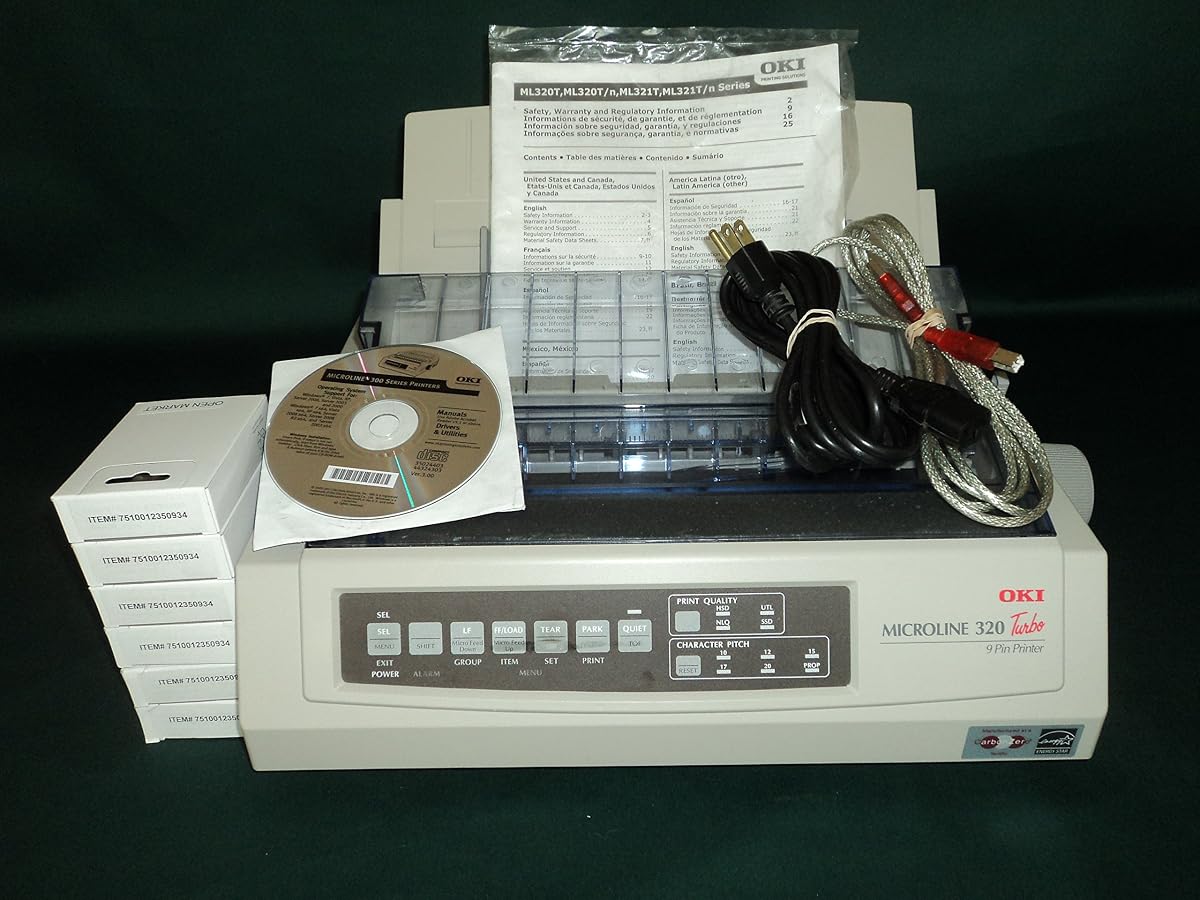
The Oki Microline 320 Turbo offers exceptional value for small businesses on a budget. Rated 4.7 stars, it proves that affordable doesn't mean unreliable. Its 9-pin system handles basic invoices and receipts with ease.
We may earn a commission when you buy through this link, at no additional cost to you.
Strengths lie in its low maintenance requirements and compact desktop design. It fits easily into tight workspaces without sacrificing functionality. Users report consistent performance over long periods with minimal ribbon changes.
Trade-offs include slower speeds compared to 24-pin models and fewer connectivity options. For low to medium volume tasks, this is negligible. The cost savings make it a smart choice for startups.
Buy this if you need reliable printing without breaking the bank. It is perfect for retail counters or small offices handling moderate daily volumes.
Affordable pricing and low consumable costs keep total ownership expenses down.
Small size ensures it fits neatly on crowded desktops without obstruction.
We may earn a commission when you buy through this link, at no additional cost to you.
The Oki Microline 620 leads the premium category with a 4.8 rating. It excels in high volume environments requiring precise sharp printing. Its simplified media loading reduces operator downtime significantly.
We may earn a commission when you buy through this link, at no additional cost to you.
Key strengths are its high volume versatility and robust build quality. Users love the sharp print quality which remains consistent over time. The design simplifies reloading paper even in busy shifts.
Trade-offs include a higher price tag and weight. However, for heavy industrial use, these are minor concerns. The reliability and output quality justify the investment for critical tasks.
Choose this for mission critical printing where quality and uptime matter most. It is best suited for logistics centers or large corporate document rooms.
Sharp and precise output ensures professional looking documents every time.
Built to handle heavy daily loads without performance degradation.
We may earn a commission when you buy through this link, at no additional cost to you.
This OKI MICROLINE 320 Turbo variant is a workhorse for daily business needs. With a 4.5 rating, it balances speed and reliability well. The 20000 page duty cycle suits small to medium enterprises.
We may earn a commission when you buy through this link, at no additional cost to you.
Strengths include solid build quality and flexible USB parallel ports. It handles draft mode efficiently at 435 cps. Users find it robust enough for continuous operation without frequent jams.
Trade-offs are noise and size which are typical for impact printers. However, the performance outweighs these minor inconveniences. It remains a strong choice for general office use.
Buy this for standard invoice and receipt printing tasks. It is ideal for offices needing a dependable printer without high-end features.
Supports up to 20000 pages monthly for consistent business use.
USB and parallel ports ensure compatibility with older and newer computers.
We may earn a commission when you buy through this link, at no additional cost to you.
The OKI 62418701 is praised for its energy efficiency and speed. Rated 4.5 stars, it offers 570 cps speed which is impressive for 9-pin. The Energy Star rating helps reduce operational costs over time.
We may earn a commission when you buy through this link, at no additional cost to you.
Key strengths are the high duty cycle of 24000 pages and connectivity options. It handles heavy loads well while maintaining print quality. Users note its stability in busy shipping departments.
Trade-offs include price and weight. However, the energy savings and speed make it a long-term value. It is a great choice for eco-conscious high volume offices.
Choose this if energy savings and speed are priorities. It fits well in warehouses needing robust and efficient printing solutions.
Energy Star certification reduces power consumption during extended operation.
24000 pages monthly rating ensures reliability under heavy workloads.
We may earn a commission when you buy through this link, at no additional cost to you.
The Oki MICROLINE 320 Turbo is a 5.0 rated machine valued for its connectivity. It offers serial, parallel, and USB ports for maximum flexibility. This versatility supports legacy systems effectively.
We may earn a commission when you buy through this link, at no additional cost to you.
Strengths include its 20000 pages duty cycle and reliability. Users praise the ease of integration with various hardware setups. It delivers consistent results for critical business documents.
Trade-offs involve premium pricing and limited modern software support. However, for hardware flexibility, it is unmatched. It serves industries relying on older infrastructure well.
Buy this for environments requiring specific serial connectivity. It is best for factories or logistics using older computer systems.
Multiple ports allow connection to almost any computer interface.
Perfect rating reflects user satisfaction with uptime and print quality.
We may earn a commission when you buy through this link, at no additional cost to you.
The Epson LQ-2090II offers solid 24-pin performance with a 3.7 rating. It is designed for speed at 550 cps which aids workflow. The Energy Star rating ensures efficient energy use.
We may earn a commission when you buy through this link, at no additional cost to you.
Key strengths include the high speed mono print and parallel port reliability. Users find it robust enough for industrial documents. It handles multipart forms without issues.
Trade-offs are the lack of USB support and lower user rating. However, for parallel environments, it is effective. It works well in older office setups.
Choose this if you need 24-pin speed at parallel ports. It is suitable for industrial settings prioritizing speed over modern connectivity.
550 cps speed enables quick document processing for busy teams.
24-pin head provides clearer text and sharper output than 9-pin.
We may earn a commission when you buy through this link, at no additional cost to you.
The OKI62411601 excels with zero-tear and multi-copy capabilities. Rated 4.2 stars, it is built for efficient document production. It can produce up to 6 interleaf copies easily.
We may earn a commission when you buy through this link, at no additional cost to you.
Strengths include reliable feeding at 5 inches per second. Users appreciate the waste reduction from auto-park tech. It maintains steady output for routine business forms.
Trade-offs are limited speed compared to 24-pin models. However, for multipart forms, it is optimized. It is a practical choice for invoicing.
Buy this for carbon copy needs and reliable feeding. It is ideal for offices handling bulk invoices or receipts.
Automated feeding reduces paper waste during daily operations.
Ability to print up to 6 copies simultaneously simplifies workflows.
We may earn a commission when you buy through this link, at no additional cost to you.
The Oki Microline 620 simplifies media loading for operators. Rated 4.8 stars, it focuses on user convenience and high volume. Its sharp printing ensures professional output quality.
We may earn a commission when you buy through this link, at no additional cost to you.
Key strengths include versatility and simplified media loading. Users report fewer paper jams and easier maintenance. It supports a wide range of document types effectively.
Trade-offs are cost and weight which may limit smaller setups. However, the ease of use justifies these factors. It is great for teams valuing efficiency.
Choose this for easy media handling and sharp output. It is best for large teams requiring consistent and reliable printing.
Simplified media loading reduces operator fatigue and downtime.
Handles various media types for diverse business printing needs.
We may earn a commission when you buy through this link, at no additional cost to you.
The Epson LQ-590 supports IBM PPDS for legacy systems. Rated 3.7 stars, it offers solid 24-pin impact performance. Its USB support helps modern connectivity needs.
We may earn a commission when you buy through this link, at no additional cost to you.
Strengths include IBM compatibility and durable design. Users find it stable for routine print tasks. It handles standard forms well in older environments.
Trade-offs are limited features and older model status. However, for specific IBM needs, it is valuable. It serves niche businesses effectively.
Buy this for IBM PPDS environments. It is best for legacy systems requiring specific printer emulation.
IBM PPDS support ensures compatibility with older software applications.
USB support bridges gap between legacy and modern computers.
We may earn a commission when you buy through this link, at no additional cost to you.
Selecting the right dot matrix printer requires evaluating speed, durability, connectivity, and compatibility. Understanding these factors ensures you invest in a model that supports your specific operational demands efficiently.
Print speed measured in characters per second (cps) determines throughput. Higher cps means faster output which reduces wait times. 24-pin models offer better quality than 9-pin ones.
Prioritize speed that matches your daily volume needs for efficiency.
Duty cycle indicates the maximum pages a printer can handle monthly. High duty cycles are essential for heavy volume environments. Choosing below your needs risks premature wear.
Select a model rated for at least your peak monthly volume.
Modern printers offer USB while legacy models need serial or parallel. Ensure the printer supports your computers interfaces. Network options are rare but useful for shared use.
Match ports to your existing hardware to avoid extra adapters.
Dot matrix printers excel at multipart forms. Check if the printer supports the required number of copies. Auto-park features can reduce paper waste during operations.
Verify support for the specific copy depth you need.
Emulation support for IBM or Epson ensures driver works. Verify software compatibility to avoid integration issues. Modern OS support varies across models.
Check driver availability for your specific operating system version.
Energy Star ratings indicate lower power consumption. Over time this reduces electricity costs. Efficient models may have lower heat output which helps room temps.
Prioritize Energy Star certified models for operational savings.
Impact printers are often bulky. Measure your workspace to ensure proper fit. Larger units may need dedicated floor space.
Account for width and depth when planning placement.
Ribbon costs vary across brands. Some models use wider ribbons that cost more. Check part availability before purchasing.
Consider long-term consumable expenses beyond initial price.
Proper setup involves connecting cables and installing drivers. Check that your interface matches the ports on the printer. Run test pages to confirm alignment and print density before production.
Regular maintenance includes cleaning the print head and rollers. Use approved cleaning tools to remove dust or debris. Replace ribbons before they run out to avoid print streaks.
Store paper in dry conditions to prevent moisture damage. Keep covers closed when not in use to prevent dust buildup. Monitor duty cycles to avoid overworking the unit.
Dot matrix printers remain essential for industries needing multipart forms and high durability. They can print carbon copies without specialized paper. Their mechanical design allows them to withstand dusty or harsh environments better than laser printers.
24-pin printers produce higher quality text with less noise. They have more pins to create finer dots for sharper output. 9-pin models are faster in draft mode but lack the resolution for professional documents.
Most dot matrix printers are monochrome only. While some specialized models exist with multiple ribbon passes, standard commercial units are black and white. This limits use for general color document printing needs.
Modern PCs usually only have USB ports. Look for models with USB support directly. If only parallel is available, USB-to-parallel adapters exist but drivers may be tricky to install on newer OS versions.
Support varies by brand and model. Epson and OKI often provide some drivers for macOS. However, many legacy models lack native support requiring workarounds or specific emulation software.
Ribbon life depends on volume and print density. Typically a standard ribbon lasts for a few thousand pages. Check print quality; fading indicates it is time to replace the ribbon cartridge.
Yes they are louder than laser or inkjet printers due to impact noise. Sound levels range from 50dB to 60dB during operation. Quiet modes may be available but reduce speed and resolution.
Most dot matrix printers handle continuous form paper well. Some models can handle labels with proper feed settings. Check media thickness limits to avoid jamming.
We reviewed ten top dot matrix printers highlighting speed and durability. The Epson LQ-590II led in performance while the Oki Microline 320 Turbo stood out for value. High volume users benefit from models like the Oki Microline 620.
Prioritize connectivity and duty cycle to match your operational needs. Ensure compatibility with your software before buying to avoid integration issues. A model that fits your workflow saves time and money over years.
Prices and availability change frequently so always check current listings. Verify warranty terms and support options for peace of mind. Our top picks reflect reliable options available this month.