
HP Smart Tank 5003
4.1Editor score
Up to three years ink included
Mess-free refill system
Cartridge-free design
This comprehensive guide compares the top AI printers available in 2026, evaluating their smart features, print quality, and value for home and office use
Artificial intelligence is transforming how we print documents and images at home and in the office. Modern AI printers offer intelligent formatting, predictive maintenance, and seamless connectivity to streamline your workflow effectively.
We evaluated ten leading models based on print speed, ink efficiency, smart features, and user feedback. Each product was analyzed for its ability to handle diverse tasks ranging from professional documents to creative projects with precision.
This list highlights the standout choices for different needs and budgets. Remember that prices and availability can change frequently, so verify the latest details before making your final purchase decision online today.
4.1Editor score

3.9Editor score

4.7Editor score
The following table provides a side-by-side comparison of all ten selected AI printers to help you quickly identify the model that best fits your specific printing requirements and budget constraints.



The HP OfficeJet Pro 8125 is a versatile all-in-one printer designed for home offices that demand reliability and professional output quality consistently. With a solid rating from users, it stands out for its ability to handle diverse document types efficiently.
We may earn a commission when you buy through this link, at no additional cost to you.
Its standout quality lies in the HP AI feature which optimizes print formatting for emails and web pages automatically. This ensures your prints look professional without wasting paper on awkward layouts or unwanted content.
While it offers significant convenience, users should note that it relies on original HP chips and may block non-HP cartridges via firmware updates. Additionally, while the Instant Ink trial is generous, long-term costs depend on subscription retention.
This printer is ideal for small business owners or home users who print frequently and value smart features that save time. It delivers consistent performance and strong security to protect your network data effectively.
HP AI removes unwanted content from web pages to ensure your prints are just the way you want.
HP Wolf Essential Security protects your network while the printer uses over 45 percent recycled plastic.
We may earn a commission when you buy through this link, at no additional cost to you.
The HP Smart Tank 5003 offers exceptional value for households needing high-volume printing without breaking the bank. Its impressive rating reflects user satisfaction with the cost-saving design and reliable performance.
We may earn a commission when you buy through this link, at no additional cost to you.
The key strength is the cartridge-free ink tank system which includes enough ink for up to three years. This eliminates the frequent and often expensive cartridge replacements associated with traditional inkjet printers.
Refilling the tanks is designed to be mess-free by simply plugging bottles into the tank. However, initial setup involves handling ink which might require a clean workspace and careful handling.
Ideal for students or families printing homework and photos, this model saves money over time. It provides consistent quality without the hidden costs of traditional ink subscriptions.
Get up to 6000 pages right out of the box for low-cost high-volume printing.
Plug ink bottles into the tank and let them drain without squeezing or spilling.
We may earn a commission when you buy through this link, at no additional cost to you.
The Bambu Lab P2S Combo stands as a premium choice for those interested in advanced additive manufacturing rather than traditional documents. Its high rating highlights the professional-grade features and speed it offers.
We may earn a commission when you buy through this link, at no additional cost to you.
AI failure detection allows users to start printing with confidence as the system monitors for issues. Combined with active flowrate compensation, this ensures sharp and smooth layers on every printed object.
While the speed and multi-color capabilities are unmatched, the investment is significant compared to standard paper printers. It requires filament and maintenance typical of 3D printing workflows.
This printer is perfect for hobbyists and small businesses creating prototypes or custom parts. It brings professional-grade 3D printing to users seeking high-speed precision and reliability.
Print up to 600mm per second while maintaining exceptional accuracy for sharp corners.
Adaptive airflow balances cooling and heat retention for overhangs and engineering materials.
We may earn a commission when you buy through this link, at no additional cost to you.
The HP Envy 6155 excels for home users prioritizing high-quality photos and everyday documents. Its robust rating suggests strong performance in color reproduction and usability.
We may earn a commission when you buy through this link, at no additional cost to you.
The True-to-Screen technology ensures documents and photos look vibrant exactly as they do on your monitor. This makes it an excellent choice for casual photographers and creative projects.
With a smaller input tray and slower color speeds compared to office models, it may struggle with heavy print loads. However, for general home use, it provides the right balance.
This printer is best suited for families who want rich colors and reliable connectivity. It simplifies the process of printing photos from your phone with ease.
Print documents and photos that look as vibrant as they do on your screen with P3 technology.
Smoothly navigate your printer with the easy-to-use 2.4 inch touchscreen interface.
We may earn a commission when you buy through this link, at no additional cost to you.
Designed for busy offices, the HP OfficeJet Pro 9135 delivers high-speed color printing and scanning to keep workflows moving. Its strong user rating confirms its reliability for daily business tasks.
We may earn a commission when you buy through this link, at no additional cost to you.
The single-pass 2-sided scanning is a major advantage for processing multi-page documents quickly. Combined with two 250-sheet trays, it minimizes paper reloading interruptions effectively.
While the cost is higher than home models, the speed and capacity justify the investment for small businesses. Users should manage security expectations as firmware updates may affect compatibility.
This model is the go-to for offices needing fax and scanning capabilities alongside fast printing. It ensures your business documents are handled efficiently and securely.
Auto document feeder with single-pass 2-sided scanning speeds up your document processing.
HP Wolf Pro Security bolsters security to keep your network protected from cyber threats.
We may earn a commission when you buy through this link, at no additional cost to you.
The HP Smart Tank 7603 is a powerhouse for home offices requiring high-volume output without frequent refills. Users appreciate the cost savings and the convenience of its refillable design.
We may earn a commission when you buy through this link, at no additional cost to you.
With enough ink for up to 3 years out of the box, it reduces the frequency of maintenance tasks significantly. The included fax feature adds versatility for those still needing hardcopy communication.
While it lacks automatic duplex printing compared to laser models, the cost per page is incredibly low. This trade-off is acceptable for users focused on saving money over time.
Best for users printing thousands of pages monthly, this printer provides value and reliability. It simplifies ink management and supports large jobs without interruptions.
Get up to 8000 color pages right out of the box for low-cost printing.
Print, copy, scan, and fax all from one device with easy mobile wireless options.
We may earn a commission when you buy through this link, at no additional cost to you.
The HP OfficeJet Pro 8139 strikes a balance between performance and value for home offices. Its rating highlights its reliability and the benefit of a full year of Instant Ink trial.
We may earn a commission when you buy through this link, at no additional cost to you.
Users gain a significant head start on ink costs, making it attractive for those new to subscription models. The fax capability adds utility for businesses needing to send documents securely.
While it performs well, reliance on original chips means you must be mindful of aftermarket cartridges. Regular firmware updates ensure security but may lock out unauthorized parts.
This model is recommended for those wanting professional features like fax without a high entry price. It delivers consistent color and speed for everyday business documents.
Get one year of Instant Ink trial to save up to 50 percent on ink.
Send and receive documents directly from your device using fax capability.
We may earn a commission when you buy through this link, at no additional cost to you.
Receiving strong feedback, this model is favored for its ability to provide high-volume printing without frequent interruptions. The refillable design is a major draw for budget-conscious users.
We may earn a commission when you buy through this link, at no additional cost to you.
The mess-free refill system allows you to replenish ink easily without squeezing or spilling. This convenience makes it easy to maintain high performance for both home and small office use.
While it takes up some space, the reliability and cost benefits outweigh the footprint for most. It is an excellent choice for those tired of buying cartridges regularly.
Ideal for users seeking a last printer they won't need to replace often, it delivers quality text and colors efficiently. It supports wireless printing and mobile apps well.
Replenish ink with HPs easy-access mess-free refill system quickly.
Create vibrant borderless photos and documents with high-quality color output.
We may earn a commission when you buy through this link, at no additional cost to you.
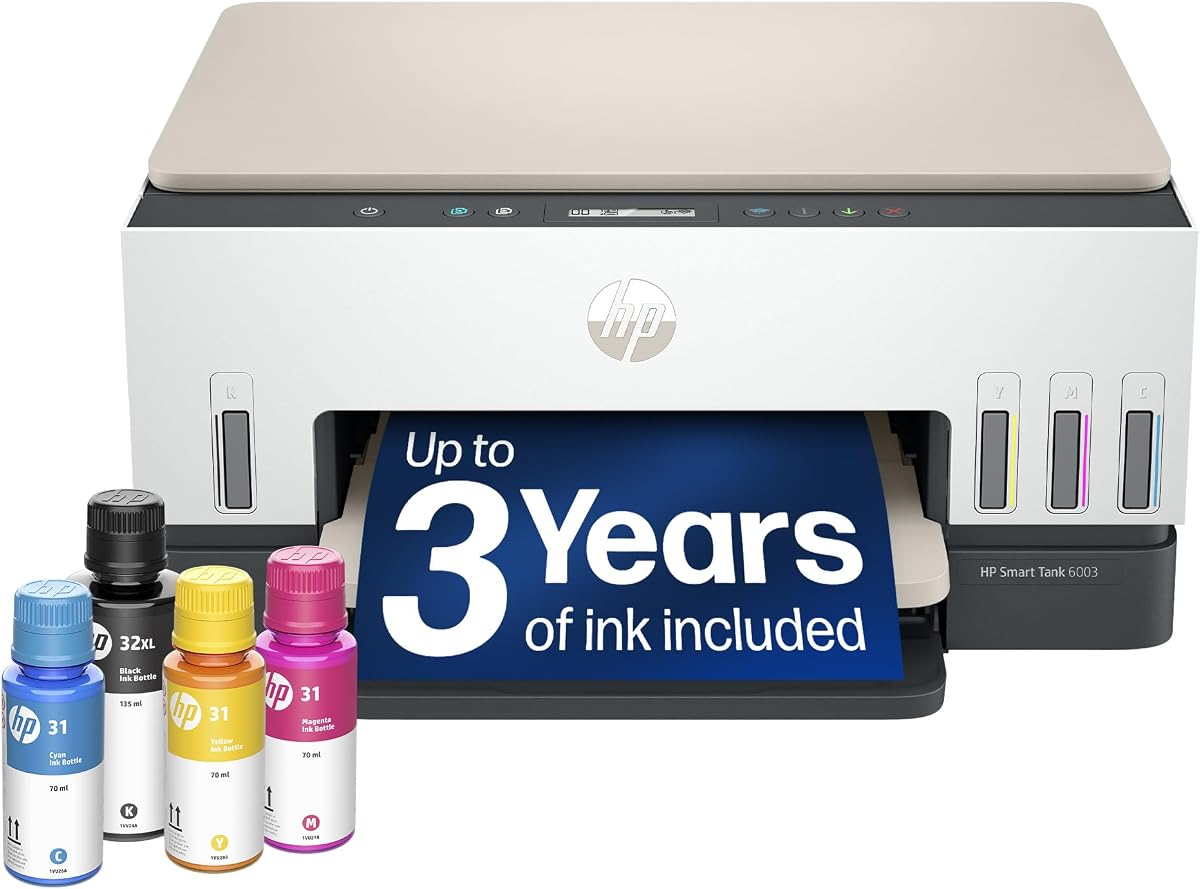
The HP Smart Tank 6003 is designed for those who want reliable ink volume without the bulk of larger office units. Users value the long-term savings and ease of use.
We may earn a commission when you buy through this link, at no additional cost to you.
It includes enough ink to last up to 3 years, making it a smart choice for households with steady printing needs. The cartridge-free design removes the hassle of traditional replacements.
While it lacks fax functionality found in some other models, it remains a strong contender for general use. Setup is quick and mobile printing is seamless for convenience.
Best for families needing simple reliable printing, it offers high capacity and quality. It handles photos and documents well for everyday tasks.
Get up to 3 years of HP Ink included for low-cost high-volume printing.
Stay connected with reliable dual-band Wi-Fi and mobile printing apps.
We may earn a commission when you buy through this link, at no additional cost to you.
The Liene PixCut S1 brings creative crafting into the home with precise AI-driven cutting and printing. Users rate it highly for its ability to produce vibrant stickers quickly.
We may earn a commission when you buy through this link, at no additional cost to you.
Its AI image extraction recognizes subjects from photos and cuts them perfectly following every edge. This simplifies the process of creating custom designs and labels significantly.
While it focuses on smaller formats, the quality of thermal dye-sublimation prints is exceptional. The lack of a subscription requirement makes it even more appealing for hobbyists.
Ideal for crafters and gift makers, it turns ideas into custom creations effortlessly. It saves time by printing and cutting in one step seamlessly.
Unleash your creativity with AI image extraction that automatically recognizes subjects.
Say goodbye to using separate machines as print and cut in one step.
We may earn a commission when you buy through this link, at no additional cost to you.
Selecting the right AI printer requires considering various factors that affect performance, cost, and usability.
Print speed is measured in pages per minute (ppm) and determines how quickly your documents are produced. For office environments, higher speeds reduce waiting times and improve overall productivity significantly.
Prioritize models with higher ppm for black text if you print large volumes regularly.
Ongoing ink expenses can quickly exceed the initial cost of the printer itself. Tank models often provide lower costs per page compared to traditional cartridge systems.
Choose printers with refillable tanks or subscription options that fit your budget.
Modern AI printers rely on robust wireless connections like dual-band Wi-Fi to ensure seamless integration with your devices. Look for models with reliable connectivity features to avoid frequent disconnection issues.
Ensure the printer supports both 2.4GHz and 5GHz bands for stable performance.
AI features like auto-formatting and failure detection add value by saving time and reducing errors. These technologies can optimize document layouts and predict maintenance needs effectively.
Look for smart tools that automate repetitive tasks and improve efficiency.
Protecting sensitive data is crucial, especially for business users handling confidential documents. Advanced models include security suites to prevent cyber threats and secure network access.
Opt for devices with built-in security protocols and regular firmware updates.
Some printers excel at handling specific media types such as thick paper, glossy photos, or specialized labels. Ensure the model you choose supports the materials you need most.
Check the input tray capacity and supported media sizes before buying.
Regular maintenance tasks like cleaning print heads or refilling tanks vary in difficulty between models. Consider how much time you can dedicate to upkeep when selecting a device.
Tank printers typically require physical ink handling, while cartridges may need frequent swaps.
An all-in-one printer offers scanning, copying, and faxing capabilities alongside printing. This consolidation can save desk space and simplify your workflow significantly.
Identify which functions are essential for your daily tasks to avoid overpaying.
Start by connecting your printer to a stable Wi-Fi network and installing the manufacturer's mobile app. This allows you to configure settings and update firmware before printing your first document.
Use high-quality media recommended by the manufacturer to prevent jams and ensure optimal print quality. Regularly check ink levels and refill tanks carefully to avoid spills and clogs.
Run maintenance utilities provided by the app to keep nozzles clean and calibration accurate. Schedule these checks monthly to extend the lifespan of your device and maintain performance.
An AI printer includes smart features like automatic formatting and predictive maintenance that optimize output. These capabilities reduce wasted paper and improve connectivity reliability significantly.
While the initial cost can be higher, AI features like optimized printing often save money on ink and paper over time. The long-term value usually offsets the higher upfront investment.
Most AI printers come with dedicated mobile apps that handle the smart features automatically. You do not need to install complex software on your computer to use these functions.
Some models use chips to ensure only original cartridges are used to maintain warranty coverage. Always check the manufacturer's policy on third-party supplies before purchasing to avoid issues.
Regular maintenance includes cleaning print heads, checking for firmware updates, and keeping ink levels adequate. Running maintenance utilities through the manufacturer's app keeps the device running smoothly.
Many modern AI printers include security features like encryption and network protection to safeguard data. Verify that the model you choose has robust security tools for business use.
If smart features fail, try updating the firmware and checking your network connection. Support teams can often provide troubleshooting steps to restore functionality quickly.
Yes, many AI printers support borderless photo printing and optimized color management. For high-quality photos, look for models with specific photo ink sets or dye-sublimation technology.
In summary, the HP OfficeJet Pro 8125 leads as the top choice for general use, while the Smart Tank models offer exceptional value for high volume.
Consider your specific needs such as ink costs, speed, and smart features when making your decision to ensure the printer fits your workflow.
Remember to verify current prices and availability online before purchasing as models and deals change frequently in the market.