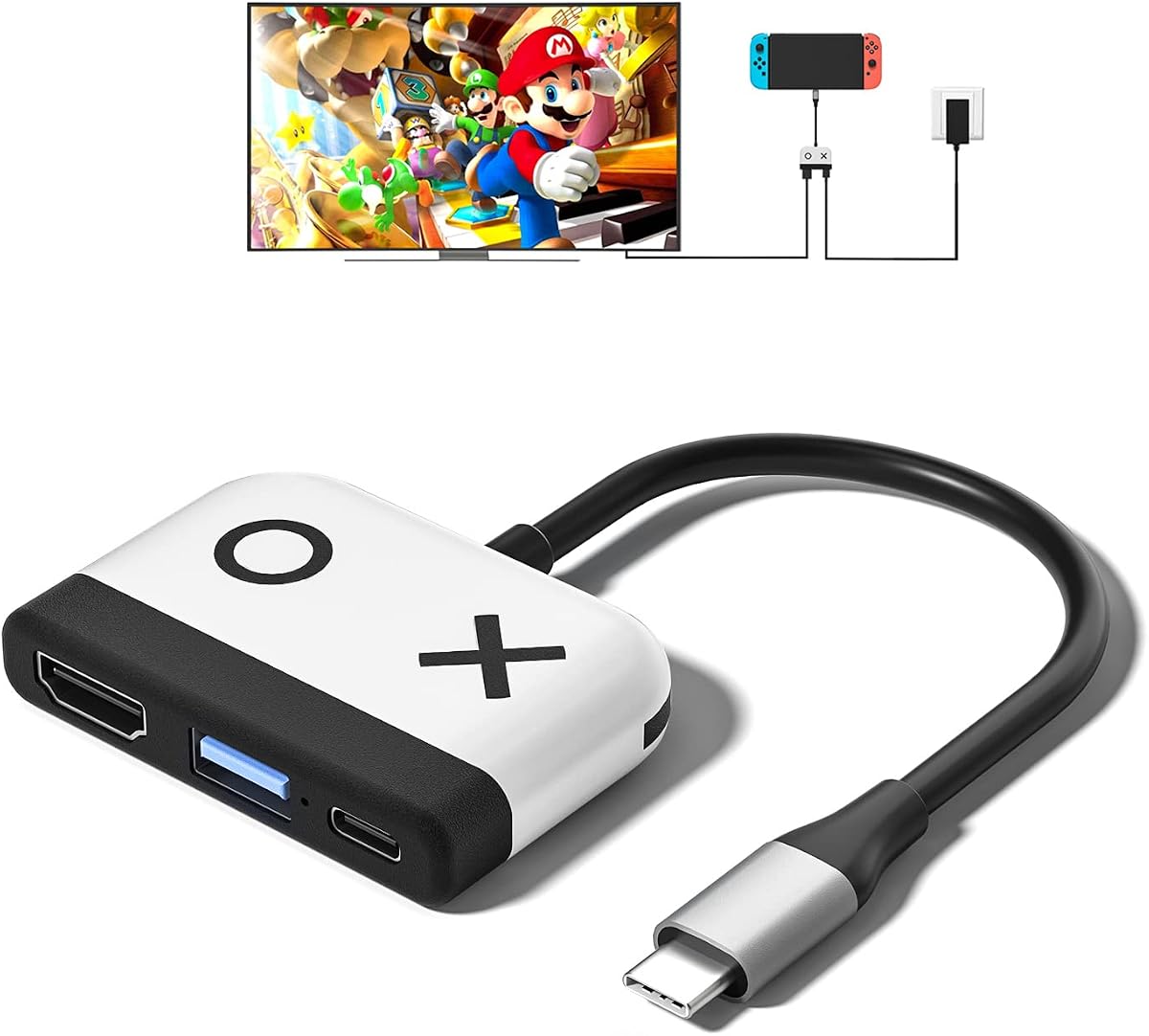
Switch Dock for Nintendo Switch/Switch OLED
4.4Editor score
Wear-Resistant Silicone Material
Supports 4K and 1080P
Compact Pocket-Sized Design
This guide compares the top portable docks for Nintendo Switch and Switch 2, focusing on 4K output, PD charging, and travel-friendly designs.
Finding the right dock for your Nintendo Switch can transform your gaming experience from handheld to home theater. A good portable dock should be lightweight, support high-resolution output, and allow you to charge while playing without overheating.
We evaluated ten leading options based on compatibility, port selection, build quality, and real-world performance. Our analysis covers models designed for the original Switch, OLED, and the upcoming Switch 2, ensuring you get the best value.
Each pick highlights key features like HDMI version, USB throughput, and charging wattage. Remember that prices and availability change frequently, so check current listings before making your final decision for your travel setup.
4.4Editor score

4.4Editor score

4.4Editor score
The following table provides a side-by-side comparison of all ten selected portable docks. Review the specifications carefully to determine which model best fits your specific gaming needs and travel requirements.


The pdobq Switch Dock offers exceptional value for gamers looking to replace their bulky original dock with a travel-friendly alternative. With a solid rating of 4.2 stars, it has proven reliable for users connecting to HDTVs and monitors alike.
We may earn a commission when you buy through this link, at no additional cost to you.
Its standout feature is the forward-looking compatibility with Switch 2 models, ensuring your investment remains relevant even as new hardware releases. The HDMI 2.0 port supports crisp 4K/60HZ output on compatible TVs, while the USB 3.0 port allows for fast data transfer and peripheral connection.
While it lacks support for the Switch Lite, this dock excels for the main consoles. Users should note that a specific 15V or 20V charger is needed to activate TV mode, which is a minor trade-off for such a versatile hub.
This dock is ideal for travelers who need a reliable connection for both gaming and media streaming. If you own a standard Switch or OLED and want future-proofing, the pdobq model stands out as a top recommendation.
Support for Switch 2 ensures longevity for your hardware investment.
USB 3.0 port allows for fast file transfers and peripheral use.
We may earn a commission when you buy through this link, at no additional cost to you.
The RREAKA TV Dock distinguishes itself with a premium aluminum alloy build that feels robust yet weighs only 1.5 ounces. Rated 4.4 stars, it is a favorite among users who prioritize durability alongside portability for their travel setups.
We may earn a commission when you buy through this link, at no additional cost to you.
Its 4K@60Hz HDMI output delivers exceptionally crisp visuals, making it perfect for high-definition gaming on modern TVs. The inclusion of a 100W PD charging port means you can power even demanding devices without worrying about battery drain during long sessions.
While the build quality is excellent, users must ensure they have a compatible charger to utilize the full 100W potential. Additionally, the price point is slightly higher than budget options, but the durability justifies the cost for frequent travelers.
This dock is the best choice for those who want a professional-grade travel accessory that can handle daily wear and tear. If you need a dock that looks as good as it performs on Switch 2 or OLED, RREAKA is the top pick.
Aluminum alloy construction ensures longevity and a sleek look.
100W PD charging supports fast charging for all USB-C devices.
We may earn a commission when you buy through this link, at no additional cost to you.
The Kstkry Switch Dock proves that you do not need to spend a fortune to get a reliable travel solution. With a rating of 4.4 stars, it is a top choice for budget-conscious gamers who need a simple, effective way to connect to a TV.
We may earn a commission when you buy through this link, at no additional cost to you.
Its silicone exterior provides excellent protection against scratches and minor impacts, making it perfect for stuffing into a bag. The design is incredibly compact, fitting easily into a pocket, while still supporting 4K video output and fast USB data transfer.
The main trade-off is that silicone is less durable than metal over very long periods, and it lacks active cooling. However, for casual travel use, this dock offers immense value and functionality without breaking the bank.
If you want a no-frills dock that gets the job done for Switch or OLED, the Kstkry is unbeatable. It is the perfect backup dock to keep in a spare bag or share with friends during multiplayer nights.
Wear-resistant silicone ensures the dock stays looking new longer.
Pocket-sized design makes it easy to carry in any bag.
We may earn a commission when you buy through this link, at no additional cost to you.
The iPLYGAM Switch Dock offers a robust 6-in-1 design that expands connectivity for your console significantly. Rated 4.0 stars, it appeals to users who want to connect multiple devices, such as controllers and flash drives, while docked.
We may earn a commission when you buy through this link, at no additional cost to you.
Its anti-skid pads provide stability on smooth surfaces, and the LED light gives visual feedback on connection status. The smart chip protects against overcharging and overheating, ensuring your console stays safe during long play sessions.
However, the lack of included cables means you must use your own HDMI and charger, which adds to the initial cost. Also, the extra ports add a bit of weight, making it slightly less ideal for ultra-light travel.
For home use or stationary setups where you need multiple USB connections, this dock is very practical. If you prioritize functionality over minimal weight, the iPLYGAM model provides excellent versatility for your gaming station.
Six ports allow for multiple peripherals and simultaneous data transfer.
Built-in LED light helps verify connection status instantly.
We may earn a commission when you buy through this link, at no additional cost to you.
The Travel Portable Switch 2 Dock is a forward-looking option designed to work with the latest hardware releases. With a 4.4 rating, it is highly regarded for its seamless transition to 4K@60Hz displays and quick setup process.
We may earn a commission when you buy through this link, at no additional cost to you.
Users appreciate the ability to tweak HDR settings to improve picture quality, offering a level of control often found in expensive hubs. The 100W PD charging ensures your console stays powered during extended sessions on the road.
The primary limitation is that it does not work with the Switch Lite, so it is strictly for TV-capable models. Additionally, you will need to supply your own power adapter and HDMI cable to get started.
This dock is perfect for early adopters who want to prepare for the next generation of gaming. If you are upgrading to a new console soon, this dock ensures you are ready for high-definition portable play immediately.
HDR tweak options allow for better color and contrast on big screens.
100W charging capability keeps your device ready for long sessions.
We may earn a commission when you buy through this link, at no additional cost to you.
This Switch Dock emphasizes universal compatibility, working not just with Nintendo consoles but also with devices like ROG Ally and Legion Go. With a 4.2 rating, it is praised for its reliability across different platforms and easy setup.
We may earn a commission when you buy through this link, at no additional cost to you.
The 100W pass-through charging means you can keep your high-power devices running without extra adapters. Its sleek design fits nicely into any bag, making it a versatile tool for travelers who carry multiple gadgets.
While it is a generic model, users report consistent performance for mirroring screens. The main concern is that generic packaging and branding might not offer the same reassurance as a dedicated gaming brand.
If you use multiple USB-C gaming devices, this dock offers great flexibility. It is a solid choice for those who want one hub that can handle various handhelds without needing to buy separate adapters.
Compatible with a wide range of USB-C handheld gaming devices.
100W pass-through charging ensures uninterrupted gaming sessions.
We may earn a commission when you buy through this link, at no additional cost to you.
The BIYTC Switch Dock provides a reliable, straightforward solution for connecting your console to a TV. Rated 4.2 stars, it is known for simplicity and consistent performance in standard gaming scenarios.
We may earn a commission when you buy through this link, at no additional cost to you.
Its pocket-size design makes it easy to stash in a bag, and the USB 3.0 port allows for peripheral connections. The setup is straightforward, requiring just a few steps to activate TV mode with a compatible charger.
The dock focuses on core functions without extra frills, which helps keep costs down. However, it uses basic plastic materials, which may feel less premium than aluminum options over time.
This dock is suitable for casual users who need a dependable travel companion. If you value simplicity and reliability over advanced features, the BIYTC model gets the job done efficiently.
Straightforward design ensures ease of use for everyone.
USB 3.0 port ensures fast data transfer speeds.
We may earn a commission when you buy through this link, at no additional cost to you.
This dock is marketed as an upgrade for the new Switch 2 but works broadly across many USB-C devices. With a 4.2 rating, it is appreciated for its adaptability and support for high-speed data and power.
We may earn a commission when you buy through this link, at no additional cost to you.
The 4K@60Hz HDMI output ensures sharp visuals, while the 100W PD port supports fast charging for laptops and tablets too. Its broad compatibility makes it useful for travelers with multiple electronics.
Since cables are not included, you must have your own HDMI cable and charger ready. Also, ensure your devices support DP Alt Mode for video output to work correctly.
If you have a mix of devices and want one dock for all, this is a strong option. It balances power and performance well, making it versatile for both gaming and productivity on the go.
USB 3.0 ports ensure quick file transfers between devices.
4K@60Hz HDMI supports modern high-definition displays.
We may earn a commission when you buy through this link, at no additional cost to you.
The Switch 2 Dock HDMI Dock stands out with its classic black and white color scheme. With a 4.3 rating, it combines style with functionality, offering a premium feel in a tiny form factor.
We may earn a commission when you buy through this link, at no additional cost to you.
Its aluminum alloy build ensures durability, and the weight is a manageable 1.59 ounces. The HDMI 2.0 port supports crisp 4K@60Hz visuals, making it a great companion for modern televisions.
While it does not include a charger, following the official adapter recommendation ensures stable performance. The limited number of USB ports might not suit power users with many accessories.
For those who value aesthetics as much as function, this dock is a winner. It is perfect for users who want a stylish, compact solution for high-definition portable gaming.
Classic color design makes it look great in any setup.
Aluminum alloy offers a premium feel and durability.
We may earn a commission when you buy through this link, at no additional cost to you.
The Portable Dock Station for Nintend0 Switch features a unique top-loading design and advanced cooling vents. With a 3.6 rating, it is an interesting choice for those who prioritize heat management during long sessions.
We may earn a commission when you buy through this link, at no additional cost to you.
The ventilation system helps dissipate heat, and the smart chip protects against electrical issues. The top button allows easy switching between handheld and TV modes without unpluging.
However, the lower rating suggests some inconsistency in user experiences. The top-loading design is unconventional and may not feel as secure as traditional slide-in docks.
If you often play in hot environments and need extra cooling, this dock is worth considering. Just ensure you are comfortable with the unique placement style before buying.
Ventilation openings help keep the console cool during extended play.
Top button allows for easy mode switching without cables.
We may earn a commission when you buy through this link, at no additional cost to you.
Choosing the right dock depends on your specific needs, budget, and future hardware plans. Consider the following factors to find the perfect match for your gaming setup.
Ensure the dock supports your specific Switch model (Standard, OLED, or Switch 2). Some docks are designed for older consoles and may not work with newer hardware.
Check the product description for explicit support of Switch 2 if you are planning to upgrade soon.
Look for HDMI 2.0 ports to support 4K@60Hz output for the best visual experience. Most Switch consoles support up to 1080P, but higher resolution docks offer future-proofing.
Higher resolution support ensures you get the most out of compatible TVs and monitors.
A good dock should allow for play-while-charging with sufficient wattage. 100W PD charging is ideal for keeping your console and accessories powered during long sessions.
Ensure the dock supports Power Delivery to avoid slow charging or battery drain.
Aluminum alloy docks are more durable and dissipate heat better than plastic ones. Silicone cases offer good protection against scratches for travel.
Choose a material that suits your travel habits and protection needs.
Check for USB ports if you need to connect flash drives or controllers while docked. Some docks offer USB 3.0 for faster data transfer.
More ports mean more versatility for peripherals and file transfers.
For travel, a lightweight and pocket-sized dock is essential. Aim for docks under 2 ounces to minimize bulk in your bag.
Portability is key for a portable play setup.
Many docks do not include HDMI cables or power adapters. Verify what is in the box before purchasing to avoid extra costs.
Always use the recommended official adapter for stability.
Look for built-in smart chips that protect against overcharging and overheating. This safeguards your console during extended use.
Safety features are critical for maintaining the health of your device.
To set up, connect the official power adapter to the dock and then plug the HDMI cable into your TV. Ensure your TV is set to the correct HDMI input source.
Wake up the console and plug the USB-C cable into the dock. Wait a few seconds for the screen to switch to TV mode automatically.
Keep your dock clean by wiping it with a soft cloth. Avoid exposing it to direct sunlight or moisture to maintain its longevity.
Some newer portable docks explicitly support Switch 2. Always check the product specifications to ensure compatibility before buying. Most models listed in this guide cover future hardware.
Yes, most docks require a charger with sufficient wattage, often 15V or 20V. Using a standard phone charger may not activate TV mode.
Most portable docks support play-while-charging via PD pass-through. Just ensure you use the recommended power adapter for stability.
Generally, HDMI cables and chargers are not included in the box. You will need to provide your own cables for the connection.
Most docks support 4K@60Hz output, but the Switch itself caps at 1080P. Higher-resolution support ensures better compatibility with future hardware.
Yes, for travel. Portable docks are lighter and more compact than the original bulky dock, making them easier to carry in a backpack.
No, most docks do not support the Switch Lite because it lacks video output. They are designed for Standard and OLED models.
Ensure you have the correct charger wattage and HDMI connection. Try restarting the console or checking your TV input settings.
The RREAKA TV Dock offers premium build quality and future-proof compatibility for those who want the best. Its aluminum body and 4K@60Hz support make it a top choice for travelers.
Budget-conscious gamers will love the Kstkry Switch Dock for its affordable price and reliable performance. It provides all the essential features without the extra cost of advanced materials.
Always check current prices and stock availability before purchasing to ensure you get the best deal. With these options, you can enjoy seamless portable play anywhere you go.