
GE BigEZ OneTouch Big Button Universal TV Remote for Seniors, Easy to Use
4.3Editor score
Fully backlit buttons
Five TV brand presets
Colorblind-friendly design
This guide compares the top easy to use TV remote for seniors options focusing on button size, setup simplicity, and compatibility for elderly users.
Finding the right television controller can significantly improve daily life for older adults who struggle with complex interfaces. A good remote should feature large, clearly labeled buttons that are easy to press and see without straining the eyes.
We evaluated ten top-rated models based on user feedback, design simplicity, and compatibility with major television brands. Our analysis focuses on features that reduce frustration and promote independence for seniors and those with vision or dexterity challenges.
Each selection below highlights key strengths and limitations to help you choose the best fit for your loved one. Please note that product availability and specifications may vary over time, so verify details before purchasing.
4.3Editor score
4.2Editor score

4.4Editor score
The following table provides a side-by-side comparison of all ten selected models to help you quickly identify the most suitable option for your specific needs and television setup.


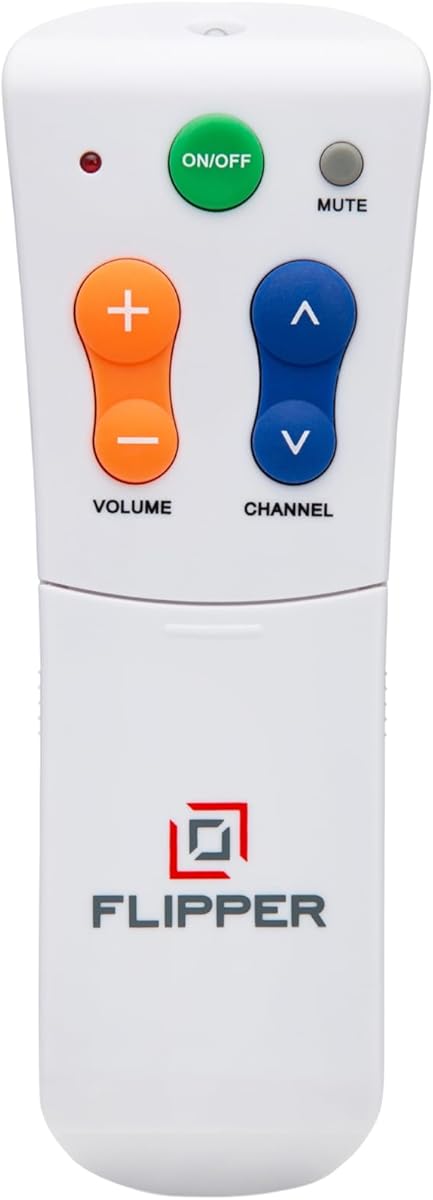
The Flipper remote stands out as our top choice for seniors who need simplicity and clarity. With a rating of 4.2 stars, it addresses common pain points like overwhelming menus and tiny buttons by offering a drastically reduced interface.
We may earn a commission when you buy through this link, at no additional cost to you.
Its design focuses on four main buttons for power, volume, channel, and mute, each color-coded for instant recognition. Users can program up to twenty-five favorite channels, allowing them to cycle through preferred content without remembering complex numbers.
While it excels in basic TV control, it does not support navigation within streaming apps like Netflix or YouTube. This limitation is acceptable for many users who primarily watch traditional broadcast or cable channels.
This remote is perfect for caregivers seeking to restore independence for loved ones with dementia or vision loss. Its thoughtful design reduces confusion and frustration significantly.
The four main buttons are oversized and tactile, making them easy to press even for those with arthritic hands.
Caregivers can pre-program favorite channels so seniors can access their shows with just a few button presses.
We may earn a commission when you buy through this link, at no additional cost to you.
The GE BigEZ OneTouch offers exceptional value with a 4.3-star rating, making it an ideal budget-friendly choice. It features a white body that is easy to see and backlit buttons that illuminate in low light.
We may earn a commission when you buy through this link, at no additional cost to you.
Its setup is straightforward, requiring users to press a brand button and then power. The blue volume and orange channel buttons are specifically designed to be colorblind-friendly, ensuring clear distinction between functions.
While it supports five major brands and one auxiliary device, users with less common TV models might find limited compatibility. However, the included U.S. technical support helps resolve any configuration issues quickly.
This model is perfect for seniors who need a reliable, affordable remote that is easy to see and program without frustration.
The fully backlit buttons make it easy to locate and press controls even in a dark living room at night.
Distinct colors like blue and orange help users with color vision deficiencies identify functions easily.
We may earn a commission when you buy through this link, at no additional cost to you.
This premium Samsung-specific remote earns a 4.4-star rating with its advanced backlighting and convenient accessories. It is designed for seniors who struggle to see buttons in dim lighting.
We may earn a commission when you buy through this link, at no additional cost to you.
The buttons illuminate automatically when pressed and stay lit for 30 seconds, providing ample time to change channels or adjust volume. The package includes a soft silicone cover to protect against drops and spills.
While it is limited to Samsung TVs, the no-setup requirement makes it incredibly easy to use right out of the box. The included wall hook ensures the remote is always accessible and never lost on the couch.
This remote is an excellent investment for Samsung owners who need maximum visibility and durability for elderly users or those with Parkinson's disease.
The automatic backlight ensures users can see controls clearly without needing to turn on room lights.
The included silicone cover and hook protect the remote and keep it within easy reach at all times.
We may earn a commission when you buy through this link, at no additional cost to you.
The EZclicker remote is a versatile choice with a 4.2-star rating, focusing on tactile feedback and oversized buttons. It is designed to reduce errors during button presses for users with limited dexterity.
We may earn a commission when you buy through this link, at no additional cost to you.
Its setup is straightforward, requiring only a combination hold of volume and mute buttons for up to 60 seconds. The remote is compact at seven inches long, making it easy to handle and store.
While it works with top TV brands, it does not support cable boxes or streaming sticks. This simplifies its use by keeping it dedicated to the television itself.
This model is great for seniors who prefer a lightweight remote that provides clear physical feedback when pressing buttons.
The physical feedback helps users confirm presses without needing to look at the remote directly.
The lightweight design prevents hand fatigue during extended viewing sessions.
We may earn a commission when you buy through this link, at no additional cost to you.
This EZclicker variant is a 4.2-star rated option that emphasizes simplicity and portability. It is designed for users who find standard remotes too large or complex to manage.
We may earn a commission when you buy through this link, at no additional cost to you.
The remote measures six inches and features buttons with tactile feedback, ensuring precise presses without accidental clicks. It pairs easily with top TV brands using a simple button combination.
It excludes support for streaming sticks or cable boxes, focusing solely on TV functions. This restriction helps eliminate confusion by keeping the remote focused on one device.
This remote is ideal for seniors who need a small, easy-to-handle control for their television without extra features.
The six-inch size makes it easy to hold in one hand or fit into a small storage space.
By excluding streaming controls, the remote reduces clutter and cognitive load for the user.
We may earn a commission when you buy through this link, at no additional cost to you.
This remote stands out with a 4.4-star rating for its zero-setup requirement. It works immediately with major TV brands without any programming or pairing steps.
We may earn a commission when you buy through this link, at no additional cost to you.
The design features extra-large buttons, including a prominent enter key for easy navigation. A 90-day warranty adds confidence to the purchase, ensuring support if issues arise.
While it is not compatible with streaming devices, its simplicity makes it ideal for users who just want to turn on and adjust their TV.
This is the best option for those who want a plug-and-play solution without any technical hurdles.
Users can insert batteries and start using it immediately without following setup guides or codes.
The included 90-day warranty provides peace of mind for buyers concerned about product reliability.
We may earn a commission when you buy through this link, at no additional cost to you.
With a 4.4-star rating, this remote focuses on clarity and ergonomics. The layout is simplified to reduce accidental presses and confusion during use.
We may earn a commission when you buy through this link, at no additional cost to you.
Its lightweight body fits comfortably in smaller hands, making it easier to use for seniors with arthritis. The buttons are clearly marked to improve visibility and accuracy.
It works with most major TV brands but does not support streaming or cable boxes. This focus on traditional TV control keeps the remote straightforward and easy to navigate.
This model is suitable for seniors who prioritize a simple and comfortable design over advanced features.
The lightweight body reduces strain on the hand during repeated use throughout the day.
Clear labels ensure users can identify buttons quickly without squinting or guessing.
We may earn a commission when you buy through this link, at no additional cost to you.
This Philips remote offers a 3.8-star rating, providing a dark aesthetic with backlit buttons. It is designed for seniors who prefer a black remote that matches modern TV setups.
We may earn a commission when you buy through this link, at no additional cost to you.
The OneTouch setup makes pairing simple by pressing one button to sync with compatible TVs. A directional pad helps navigate basic menus on smart TVs or streaming devices.
While it supports five major brands, the lower rating suggests potential usability issues compared to brighter options. However, U.S. technical support is available to help resolve problems.
This remote is a good choice for users who prefer a sleek look with basic navigation capabilities.
The black keypad is stylish and reduces glare in bright rooms while still being visible.
The directional pad allows for basic menu navigation beyond simple volume and channel changes.
We may earn a commission when you buy through this link, at no additional cost to you.
This remote is a 3.0-star rated option designed for basic traditional TV control. It emphasizes simplicity and tactile feedback for users with vision or dexterity challenges.
We may earn a commission when you buy through this link, at no additional cost to you.
The layout includes large buttons to reduce accidental presses, making it suitable for elderly users. It works with major TV brands but does not support streaming services or boxes.
While the lower rating indicates some inconsistencies, it serves its purpose for basic on/off and volume control. It is an affordable option for simple needs.
This remote is best for users who need a straightforward, low-cost solution for turning on the television.
The remote focuses on essential functions like power, volume, and channels to avoid overwhelming users.
Large buttons with tactile feedback help users confirm presses without needing visual confirmation.
We may earn a commission when you buy through this link, at no additional cost to you.
The Anderic RR1004 has a 4.0-star rating and features glow-in-the-dark keys for use in dark rooms. It is designed to offer a minimal set of controls to reduce confusion.
We may earn a commission when you buy through this link, at no additional cost to you.
Its learning function allows copying essential buttons like Netflix from an existing remote if supported by IR. The remote comes pre-programmed for LG TVs but can be set for others.
However, it does not work with RF or Bluetooth systems like Roku, requiring line-of-sight for IR signals. Users may need assistance during initial programming.
This remote is suitable for seniors who need low-light visibility and basic control options.
The glow-in-the-dark keys ensure the remote can be found and used even without room lights.
Users can copy essential functions from another remote to add basic streaming access if supported.
We may earn a commission when you buy through this link, at no additional cost to you.
Selecting the right remote requires considering button size, setup complexity, and compatibility to ensure independence and ease of use.
Large, clearly labeled buttons reduce the risk of accidental presses and make it easier for seniors with vision issues to identify functions. Look for models with distinct labels and colors that match common actions like volume and channels.
Prioritize remotes with a simplified layout that eliminates unnecessary buttons to prevent confusion during daily use.
Remotes that require minimal or no setup are ideal for seniors who may struggle with technical steps. Models offering plug-and-play functionality or simple code-free pairing save time and reduce frustration.
Choose devices that provide clear instructions or technical support in case assistance is needed during installation.
Ensure the remote works with the specific television brand and any additional devices like cable boxes or streaming sticks. Universal remotes that support multiple brands provide flexibility without sacrificing ease of use.
Confirm that the model is compatible with your TV type such as LCD, LED, or OLED to guarantee reliable performance.
Backlit or glow-in-the-dark keys are helpful for seniors who watch TV in dark rooms and need to see buttons without turning on lights. This feature allows for easier navigation during night-time viewing.
Look for remotes that offer automatic illumination when buttons are pressed to save battery life while maintaining visibility.
Sturdy construction protects the remote from accidental drops and spills, which are common among elderly users. A lightweight body reduces hand fatigue during extended use without compromising reliability.
Consider models that come with protective covers or cases to extend the lifespan of the device and keep it safe.
Long battery life reduces the frequency of replacements, which can be cumbersome for those with mobility issues. Standard AA or AAA batteries are common, but check if rechargeable options are supported for convenience.
Opt for energy-efficient remotes that have automatic power-off features to preserve battery charge when not in use.
Remotes that allow programming favorite channels enable seniors to access preferred shows without navigating complex menus. This customization promotes independence and ensures quick access to essential content.
Look for models that support memory functions to store frequently used settings for quick recall during daily viewing.
Reliable customer support and warranty coverage provide peace of mind if issues arise with the remote. Brands offering technical assistance or free replacements ensure the product remains usable over time.
Check for remotes with accessible support channels like phone or online guides to resolve setup or operational questions quickly.
To begin using your remote, insert the required batteries and ensure they are oriented correctly according to the compartment markings. Press the power button to sync with the TV and verify that the backlight activates if the model supports it.
Regularly clean the buttons with a soft dry cloth to remove dust and grime that can affect performance. Store the remote in a consistent location like a side table or dedicated holder to prevent loss and ensure accessibility.
Check battery levels periodically to avoid sudden power loss during use. Replace batteries promptly if the remote becomes unresponsive to maintain reliable control over your television.
A senior-friendly remote should feature large buttons with clear labels, a simple layout, and minimal steps for setup. High contrast and backlighting improve visibility in low light, and ergonomic designs reduce hand strain.
Some models are designed to work with cable boxes while others are TV-only. Always check the product description to confirm compatibility with your specific setup and devices.
Most simplified remotes focus on basic functions like volume and channel control rather than app navigation. They may not support streaming app menus or voice commands typical of smart remotes.
These remotes typically use standard AA or AAA batteries. Check the product specifications to confirm the required type and whether rechargeable options are supported for convenience.
Yes, many models feature large buttons, color-coded layouts, and backlighting to assist users with vision impairment. Tactile feedback also helps users locate and press buttons accurately without visual cues.
Some remotes offer plug-and-play functionality with no setup required, while others need simple pairing steps. Universal remotes may need basic programming to match your TV brand and model.
The Flipper and GE BigEZ OneTouch stand out for their simplicity and clear button layouts, making them ideal for independent viewing. The Samsung Backlit remote offers premium convenience with its illumination and included accessories for specific needs.
Prioritize features like backlighting, ergonomic design, and minimal setup to reduce frustration and improve accessibility. Choosing a remote that matches your loved one's specific vision or dexterity challenges ensures better long-term satisfaction.
Always verify compatibility with your current TV and any additional devices before purchasing to ensure seamless operation. Check the latest product details as specifications can change over time.